DimensionZ

Tag: Mac Games

  • Civilization 2 Gold Mac Review (1999)

    Civilization 2 Gold Mac Review (1999)

    This post has affiliate links. If you buy through them, we may earn a small commission at no extra cost to you. Learn more.

    From the archive: this review first ran on the Mac Gaming Alliance (MGA), the Mac games site that lived here on DimensionZ in the late 1990s. It was published around 1999 and is reproduced as originally written, with the original screenshots (click to enlarge). More in the Mac Gaming Alliance archive.

    Publisher MacSoft
    Tested on Power Mac 8600/300 w/32mb RAM
    Gameplay 4 / 5 apples
    Graphics & Sound 3 / 5 apples
    Interface 3 / 5 apples
    Difficulty 3 / 5 apples
    Bugs 2.5 / 5 apples
    Overall 3 / 5 apples
    Reviewed by Jonathan Dreyer

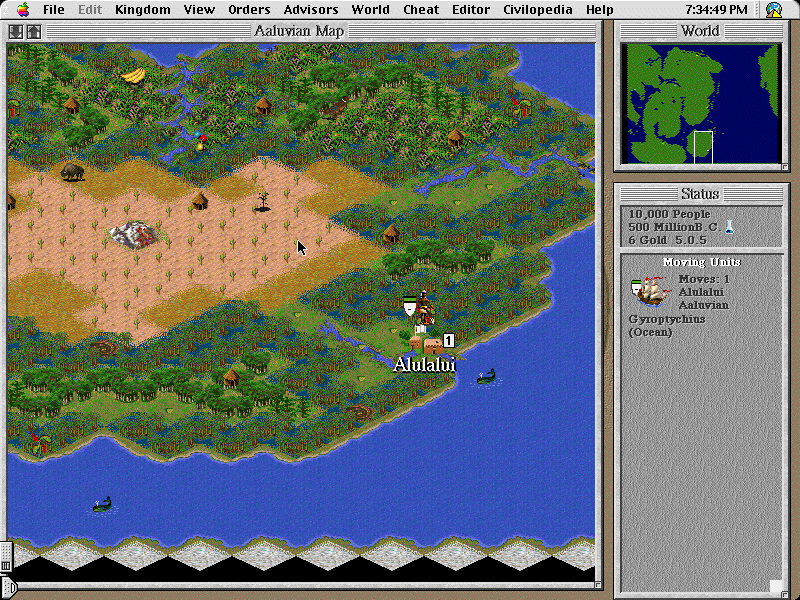
    Civilization II Gold is an upgraded version of the original Civilization II which now includes support for multiplayer and includes all of the Conflicts in Civilization and Fantastic Worlds scenarios. Other than those two items, nothing else has changed from Civilization II.

    Civilization 2 Gold screenshotThe extremely fun and addictive gameplay of Civilization II remains the same. Advance your civilization with an aspiration for worldwide domination. You can micro-manage each of your cities, or let your advisors handle the production. There are many units and buildings to construct for each of your hopefully many cities. There are treaties to be signed, and technologies to discover. Civilization II gives you a rich and complex world to dominate.

    Civilization 2 Gold screenshotThe fun of Civilization II Gold comes in the multiplayer additions. Playing your empire against another real person’s empire gives the game a lot more thrill. You can play over your Local-Area-Network, the Internet through TCP/IP, or on one computer through the “hotseat” method. Note, I would not recommend the hotseat method, unless you like getting up and sitting down a couple hundred times during a game (hence the name, hotseat).

    Civilization 2 Gold screenshotThe “Conflicts in Civilization” and “Fantastic Worlds” give you the fun of standard Civ II with the excitement of playing with all new units and lands. Defend Earth from Alien Invaders, take a side in the Civil War, these scenarios play out with a cast of characters and a plot to follow. A lot of the scenarios incorporate entirely new unit and structures for your use, greatly altering the usual gameplay.

    It appears that when adding multiplayer support, they broke a couple things… There are more than a few bugs floating around in Civ II Gold, most noticeably for me is a bug with opening saved games while file sharing is active. Hopefully a bug-fix patch will be out soon.

    Civilization 2 Gold screenshotOverall, the addition of multiplayer support, and the inclusion of the great scenario sets make Civilization II Gold a recommended buy from me, albeit a marginal one. The multiplayer aspects and the new graphics and units of some of the scenarios breathe just enough life into another otherwise tired old game to make it an enjoyable play. It did make me long for the upcoming Civilization III even more…

    Find a copy

    Civilization 2 Gold has been out of print for years, but used copies of the original Mac release still turn up, and some classics have been re-released for modern systems. Search for Civilization 2 Gold on Amazon.
  • Assault Vehicles Mac Review (1999)

    Assault Vehicles Mac Review (1999)

    This post has affiliate links. If you buy through them, we may earn a small commission at no extra cost to you. Learn more.

    From the archive: this review first ran on the Mac Gaming Alliance (MGA), the Mac games site that lived here on DimensionZ in the late 1990s. It was published around 1999 and is reproduced as originally written, with the original screenshots (click to enlarge). More in the Mac Gaming Alliance archive.

    Publisher XYZ Entertainment
    Tested on PowerMac G3 233 130 RAM (VM on)
    Gameplay 5 / 5 apples
    Graphics & Sound 4 / 5 apples
    Interface 5 / 5 apples
    Difficulty 4 / 5 apples
    Bugs 5 / 5 apples
    Overall 5 / 5 apples
    Reviewed by Marty Dodge

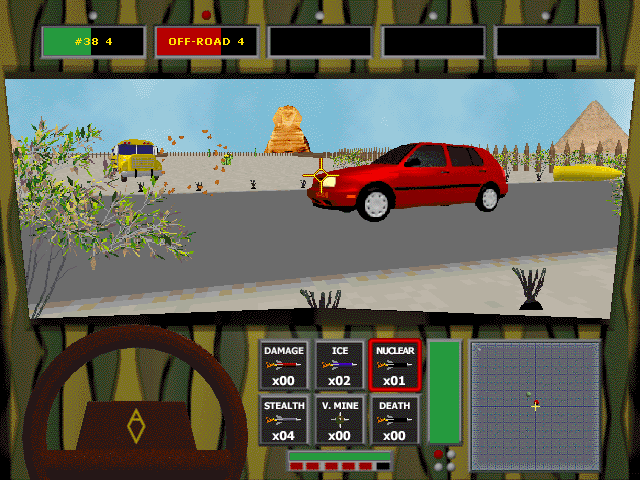
    Assault Vehicles is one of the those exceptions to the rule, it is not made by Ambrosia and it is a great game. AV has come along at the perfect time for all Carmageddon fans. Just when reliable sources inform us that Carmageddon II: Carpocalypse Now looks like it will be out in the new year at best, up pops AV to fill the gap. It is simple car combat game where you pummel your opponents with guns, rockets, mines and a few special attacks.

    Assault Vehicles screenshot
    (Click on Picture to Expand)

    Gameplay

    The game runs smoothly and rapidly on my machine in all modes. There is no screen jump or pauses. I am sure that the game is even better in Multiplayer LAN suffering none of the long loading time problems so often experienced with Carma and other games. Basically there are five zones in which one can play. These arenas (think Car Wars arenas with natural instead of cement borders.) are located in Egypt (complete with Pyramids), Himalayas, the Midwest, Siberia and South America. In the Trophy game one faces one more opponent at each level (1,2,3,4,5 max) which one has to kill to advance to the next level of play. After completing all areas one moves onto the Gold Trophy contest where one gets awards as one advances. (Options and two vehicles are amoung some of the goodies available.)

    There are two other modes, both can involve team play with other cars. These are Elimination and Kill Count, last man stranding and a pre-set kill amount respectively. Both of these ways are a great way to learn how to play the game and develop skills needed in the Trophy chase. It would also pay to try this a few times before facing human opponents in the multiplayer mode.

    Assault Vehicles screenshot
    (Click on Picture to Expand)

    Graphics/Sound

    They are not basic but not the latest either, but then again this is shareware after all. Graphics are clean and uncomplicated. There is day/night modes and even the occasional rain shower. There is no graphical object overlap that there is many games of this type. The sounds are basic cars noises, nothing special but nothing too annoying either.

    Assault Vehicles screenshot
    (Click on Picture to Expand)

    Interface/Difficulty

    The interface is mostly on the keyboard, although the mouse can be used for movement. Keys are customisable so both lefties and righties will be happy. I recommend the standard layout for movement (numeric keypad) while using the defaults for the action keys. The controls do not take too long to get used to, what takes a while is learning how to survive and avoiding sucking missiles from all sides. One sits in the car and looks out the front, below this is a basic dashboard with information about location of enemies & allies, damage and armament.

    The Trophy chase in single player is not at all easy and it takes some skill and tactics to survive past the third or fourth area. One must learn to conserve ones’ cars in the early stages so it will be possible to survive when facing 5 other opponents. Fortunately the baddies do have a habit of pummeling each other as well as you. Your allies take offence when you hit them as well, and are prone to nailing you with a missle or a shot if you hit them by mistake.

    Assault Vehicles screenshot
    (Click on Picture to Expand)

    Bugs

    None that I could find. There may have been some, as there is an update on the site for those who have earlier versions of the game.

    Conclusion

    This is a great little game that does what it does well. The only criticism I can think of is that one needs a copy of the CD is each machine on a LAN. Of course the fact that the game costs all of $15 from their website does make up for this problem. This is the perfect game for a 30 min session of flatten your co-worker. Assault Vehicles will fill the crevass in my life until Carma II comes out. If you like offensive driving games then this is the game for you.

    Find a copy

    Assault Vehicles has been out of print for years, but used copies of the original Mac release still turn up, and some classics have been re-released for modern systems. Search for Assault Vehicles on Amazon.

  • Future Cop: L.A.P.D. Mac Review (1998)

    Future Cop: L.A.P.D. Mac Review (1998)

    This post has affiliate links. If you buy through them, we may earn a small commission at no extra cost to you. Learn more.

    From the archive: this review first ran on the Mac Gaming Alliance (MGA), the Mac games site that lived here on DimensionZ in the late 1990s. It was published around late 1998 and is reproduced as originally written, with the original screenshots (click to enlarge). More in the Mac Gaming Alliance archive.

    Publisher Electronic Arts
    Tested on PowerMac 8600/300 w/ Power3D (Voodoo1 4mb)
    Gameplay 5 / 5 apples
    Graphics & Sound 5 / 5 apples
    Interface 5 / 5 apples
    Difficulty 5 / 5 apples
    Bugs 5 / 5 apples
    Overall 5 / 5 apples
    Reviewed by Jonathan Dreyer

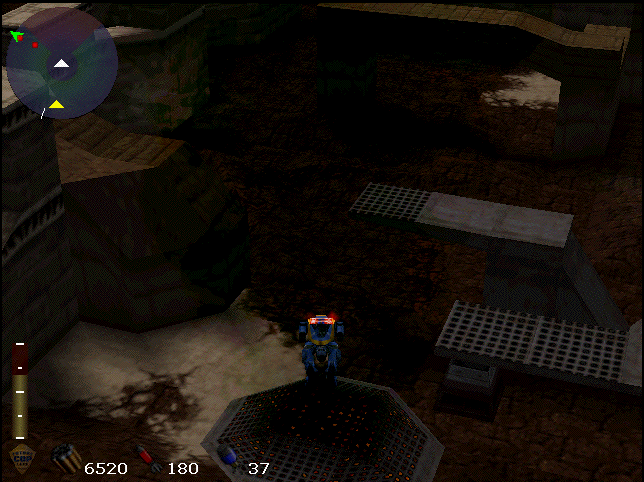
    Future Cop is when of those rare simultaneous releases for both Mac and PC. The reason being that it is a hybrid CD. I for one am very glad that the Mac version of Future Cop found it’s way onto the CD. Future Cop is one of the best games I have played in a very long time. You see the scores above, that’s not a mistake, Future Cop is the first title I have ever reviewed to score perfect on our ratings system. We’ll have to come up with some sort of award for it.

    Future Cop: L.A.P.D. screenshotFrom the Future Cop box: In the 21st Century, gangs have taken over L.A. Mutant crooks packin’ thermo nukes, bio-agents, and other bad mojo are laying siege to the City of Angels. Hit the streets in a revolutionary hovercraft, walker, and all purpose justice dispenser. With ceramite armor, the latest plasma technology, and an awesome array of high-tech weapons, it’s like playing “good cop/bad cop” only without the good cop.

    Gameplay

    Future Cop is your standard above 3rd person perspective shoot’em up with some interesting twists that make for exciting gameplay. The coolest part of the gameplay I found to be the ability to change from a mech-like walker to a hovercraft and back. There are some situations where you have no choice but to only use one or the other (such as the hovercraft over water), but in most cases you can use the form of vehicle you feel most comfortable with. With either vehicle you have access to three different weapons out of a total of 15. One “Gun” weapon (such as a mini-gun or flamethrower), one “Heavy” weapon (such as missiles), and one “Special” weapon (such as mortars). Each of these weapons also has special weapon upgrades that you will find throughout the game.

    Future Cop: L.A.P.D. screenshotFuture Cop is really 2 games in one. Crime War and Precinct Assault. Crime War is really your standard shoot’em up setting, you go through 8 stages in L.A., each stage with it’s own bosses, sub-bosses, and puzzles to go through. 8 stages may not seem like a lot, but the stages are very long and no two look the same. In Crime War you can fight alone, or through split-screen, you and a friend can work cooperatively. Precinct Assault is a rather unique concept. Two teams go at it in a battle to invade each other’s bases. During the battle, each side can create automated weaponry (such as tanks and helicopters) and fight for control of the limited number of strategically placed turrets. You can play Precinct Assault with two players, or alone against the “Sky Captain”, an artificial intelligence.

    Multiplayer is support in Future Cop as I already stated through split screen play, and also by Appletalk and TCP/IP. While network games are playable over a LAN, TCP/IP games require both players to have high speed Internet connection (sorry modem users).

    Graphics and Sound

    Future Cop: L.A.P.D. screenshotFuture Cop supports 3D accelerators using 3Dfx or Rage chipsets. Although Future Cop also supports software rendering, I found the software mode (although it looks almost as good as 3D accelerated mode) to be a bit slow and chunky. With my Power3D card the graphics in Future Cop look marvelous, the enemies, and especially the smoke effects are very well done. But the best looking effects were the explosions. Future Cop is one of the few titles, if not the only title, that supports 800 by 600 resolution with the 4 megabyte Power3D card. Future Cop should look just as stunning if not more so on an iMac.

    The ambient background music seemed to have struck just the right chord in me. I found the music to have the perfect balance of not leaving an empty void, without becoming totally annoying. On the sound effects side of the coin, I began to grow a little impatient with the sounds of crying civilians, maybe that was EA’s idea, make the civilians so annoying you have to kill them?

    Interface/Difficulty

    Future Cop: L.A.P.D. screenshot Future Cop has a nice mac friendly interface complete with all the standard dialogue boxes.

    There are the three standard difficulty levels in FC, Easy, Medium, and Hard. The differences between the difficulty levels are very hard to notice without really trying to find them. In other words, on first glance all the difficulty levels seemed the same to me.

    Bugs

    I found Future Cop to be bug free.

    Conclusion

    In conclusion, Future Cop is one of the best games I’ve played in a long time. It’s definitely one of the best games of 98, if not the best! It’s low system requirements (compared to other recent 3D fare) and excellent price (19.95 at most outlets, I’ve seem it as low as 14.99 in some stores) make Future Cop a very attractive title. I strongly reccomend this game.

    More Info

    Future Cop: L.A.P.D. screenshot

    Minimum System Requirements

    120 MHz or faster PowerMac
    24 mb RAM

    Recommended System

    180 MHz or faster PowerMac
    32 mb RAM
    3D hardware acceleration

    More information is avaliable at the official Future Cop web site at http://www.FutureCop.com/

    Find a copy

    Future Cop: L.A.P.D. has been out of print for years, but used copies of the original Mac release still turn up, and some classics have been re-released for modern systems. Search for Future Cop: L.A.P.D. on Amazon.

  • Starfleet Academy Mac Review (1998)

    Starfleet Academy Mac Review (1998)

    This post has affiliate links. If you buy through them, we may earn a small commission at no extra cost to you. Learn more.

    From the archive: this review first ran on the Mac Gaming Alliance (MGA), the Mac games site that lived here on DimensionZ in the late 1990s. It was published October 1998 and is reproduced as originally written. More in the Mac Gaming Alliance archive.

    Publisher MacPlay
    Tested on Performa 5260/100 Mhz and a PowerMac 8600/300
    Gameplay 5 / 5 apples
    Graphics & Sound 5 / 5 apples
    Interface 4 / 5 apples
    Difficulty 4 / 5 apples
    Bugs 4 / 5 apples
    Overall 4 / 5 apples
    Reviewed by Jonathan Dreyer

    Note:(Feb 2/98)

    On my new PowerMac 8600/300 I can play SFA with all options and sounds on (i had to have VM on as I only have 32 megs of RAM) and it played great! Smooth as can be!

    “Take a seat in the captain’s chair as the USS Enterprise warps into space. Starfleet Academy allows the player to command 4 Federation class ships in combat against thirty 3-D rendered space ships from a cloaked Klingon™ Bird of Prey™ to a Romulan™ heavy cruiser. Reprising their original STAR TREK roles, William Shatner as Captain Kirk, Walter Koenig as Commander Chekov and special appearance by George Takei as Captain Sulu appear in full-motion video and interact with the player as never before. A original music score by Ron Jones and the script-writing talents of Dan Greenberg, Andrew Greenberg, Bill Bridge, Sandy Fries, and Star Trek novelist Diane Carey make Starfleet Academy a truly galactic experience.” — Interplay PR

    Gameplay

    Starfleet Academy has an unusual interface. It successfully combines an adventure game with an action simulation. Before each mission you are usually presented with a video where at certain points you have to choose what your character says, these segments will greatly affect the outcome of the game so you must be very careful when you select. Following the the video segment is your mission, in each mission you will be given a list of objectives to complete before you head back to the Starbase. Sounds simple, yes? No, not only do you have to be a great combat pilot to complete the mission, you have to think like a Starfleet captain, starfleet’s orders are not always right, to complete the mission you have to find the right way to complete the objectives, you may have to take the mission a few times.

    I suggest that you use a joystick for the combat simulation segments. The combat segments are usually very fast paced, you must react very quickly to defeat your foes. The key to winning in battles is setting your damage and energy levels for combat before you actually get into combat, to end your battles quickly give your phasers as much power as possible.

    Interface

    Although Starfleet Academy’s interface is very intuitive, I have one complaint: I can’t find one Mac-like dialog box anywhere in the game, it uses completely graphical buttons. Other than that, I loved the Interface.

    Difficulty

    SFA allows you to select from the standard 3 different difficulty settings. On the first difficulty setting, “Plebe”, you shouldn’t have any trouble completing the game, that’s why I strongly suggest that you play on the medium difficulty setting.

    Bugs

    I have only encountered one bug: in the second mission with you have voices turned off the game would crash. I promptly sent in e-mail to MacPlay’s tech support and received a reply 2 days later. To get around this bug they told me to turn on voices for just that level, and viola…

    Conclusion

    In conclusion, Starfleet Academy is a great game that will give you hours of enjoyment. I must note one caveat, the system requirements: they’re pretty hefty:

    80 Mhz PowerPC or better
    25
    megabytes of RAM FREE

    First of all, 80 Mhz doesn’t cut it. Anything less than about 180 Mhz will require you to turn down the graphic option. As for the RAM, the game will run with Virtual Memory or RAM Doubler activated but the video segments will be VERY choppy.

    So I say, if your machine can run this game, you will love it even if you don’t like Star Trek.

    Find a copy

    Starfleet Academy has been out of print for years, but used copies of the original Mac release still turn up, and some classics have been re-released for modern systems. Search for Starfleet Academy on Amazon.
  • Starcraft Mac Review (1998)

    Starcraft Mac Review (1998)

    This post has affiliate links. If you buy through them, we may earn a small commission at no extra cost to you. Learn more.

    From the archive: this review first ran on the Mac Gaming Alliance (MGA), the Mac games site that lived here on DimensionZ in the late 1990s. It was published October 1998 and is reproduced as originally written, with the original screenshots (click to enlarge). More in the Mac Gaming Alliance archive.

    Publisher Blizzard
    Tested on Power Mac 8600/300 w/32mb RAM
    Gameplay 4 / 5 apples
    Graphics & Sound 3 / 5 apples
    Interface 4.5 / 5 apples
    Difficulty 2.5 / 5 apples
    Bugs 5 / 5 apples
    Overall 3.5 / 5 apples
    Reviewed by Jonathan Dreyer

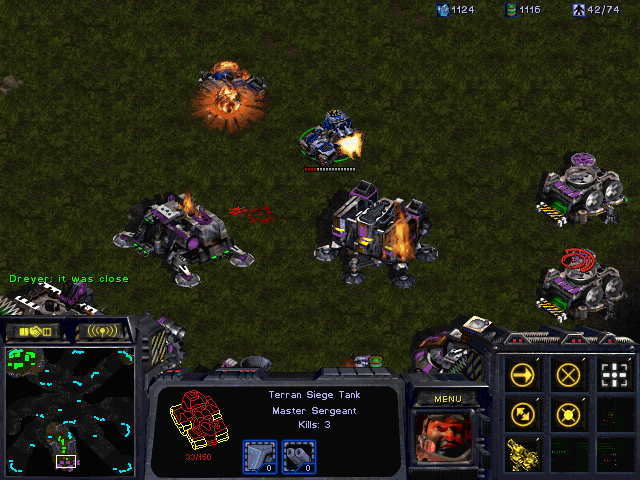
    The Mac version of Starcraft suffered a great many set-backs during it’s port from the PC. It is a full year late from it’s originally scheduled release. Starcraft was plagued with bad luck and just as it looked like it was going to make the 98 holiday season, it was delayed again, bringing it to it’s March 99 final release. Starcraft, like it’s predecessors Warcraft, features stunning between level film sequences and challenging 2D gameplay.

    Starcraft allows you to choose from three races, Human, Zerg, and Protoss. Each race has it’s own set of units and abilities. Starcraft utilizes the same gameplay style that Blizzard defined years earlier with the original Warcraft, you control everything. You have to tell the barracks to train more troops, and then you have to give those troops their orders. Like all strategy games of this type, it becomes difficulty to keep track of all your units when you have a particularly large base.

    Starcraft screenshotStarcraft also sports a more complete and complex storyline than the Warcraft series. It is set as a series of campaigns where you start as Human and end up as Protoss. You can’t move on to the Zerg campaign until you have completed the Human one. The Starcraft campaigns feature challenging missions too, not the usual “build up your base and annihilate the enemy” type mission common to most strategy games. There are complex missions when certain individual units must survive or you must steal computer files by sneaking in an enemy’s base. Those type of missions are certainly the most enjoyable.

    Of course, the best part of Starcraft is the multiplayer system over Blizzard’s free Battle.Net servers. There are numerous Blizzard made and third-party maps available. Some maps are complex games within a game involving scoring points over a limited time period. Beating our PC brethren who have been playing for more than a year now is fun too. The Battle.net servers keep track of your wins and loses and there are also ladder events and tournaments in which you can win real prizes.

    Starcraft screenshotGraphics is an area where Starcraft suffers greatly. Sadly, in the time that it took them to port Starcraft, the 2D graphics have become almost antiquated in a market where most new strategy games are using 3D. Still, Starcraft’s graphics are for the most part bright well done. Had it been released on time last year, Starcraft would have scored 4 apples.

    Starcraft’s interface is not lacking. It uses Apple’s inputsprockets to control two-button mice and gamepads, allowing iMac users to use their fancy USB muli-button mice. SC features all the important options boxes allowing the user to adjust things like sound effects volume, brightness, and even network options to prevent lag and slowdowns in muliplayer games.

    You would expect from all the delays that when Starcraft finally did ship that it would be absolutly bug-free, and you would be right. Starcraft is, as far as I can tell, completly bug-free. I did not run across any problems over the many hours of reviewing.

    Starcraft screenshotIn conclusion, Starcraft is an excellent strategy games that suffers unfairly because of it’s long delayed release. While no longer on the cutting edge, Starcraft is still a strong recommendation to buy. It offers great replayability throught the multiplayer aspect, and has challenging single-player campaigns to work your way through.

    For even more screenshots, visit our earlier Starcraft Preview

    Find a copy

    Starcraft has been out of print for years, but used copies of the original Mac release still turn up, and some classics have been re-released for modern systems. Search for Starcraft on Amazon.

  • Flying Circus Mac Review (1998)

    Flying Circus Mac Review (1998)

    This post has affiliate links. If you buy through them, we may earn a small commission at no extra cost to you. Learn more.

    From the archive: this review first ran on the Mac Gaming Alliance (MGA), the Mac games site that lived here on DimensionZ in the late 1990s. It was published September 1998 and is reproduced as originally written, with the original screenshots (click to enlarge). More in the Mac Gaming Alliance archive.

    Publisher Bullseye Software
    Tested on PowerMac w/ Power3D card
    Gameplay 3 / 5 apples
    Graphics & Sound 4 / 5 apples
    Interface 5 / 5 apples
    Difficulty 3 / 5 apples
    Bugs 5 / 5 apples
    Overall 3.5 / 5 apples
    Reviewed by David Leinbach

    Flying Circus is one of only two flight simulators available for the Macintosh that supports 3D hardware acceleration. Flying Circus is described as “Seat of the pants flying” with “no huge manual to get through” and “no weapons systems to memorize”.

    Flying Circus screenshot

    Gameplay

    Flying Circus lives up to it’s hype with fly by the seat of your pants gameplay style and simplistic controls. Unlike most modern flightsims which require the memorization of countless commands, FC is simply a fun flying game. With input sprocket you can use almost any joystick out there. It is basically point and shoot mindless flying.

    There are four different aircraft to fly in FC: Sopwith Camel, S.E. 5a, Fokker Triplane, and Fokker D-VII. Each has it’s own cockpit graphics and flying style. One thing I did find annoying is the completely unrealistic physics, I was able to do a complete loop in each plane and also fly inverted for extended periods of time. The world in FC I found to be rather sparse, containing almost no civilian structures or background objects.

    FC comes with only 20 missions, but also includes a mission editor to create countless more of your own, giving you almost unlimited replayability. The 20 included missions offer a wide variety of play.

    Flying Circus screenshot

    Graphics and Sound

    Being a 3D accelerated title, I was expecting graphics to rival that of at least Quake. I was sorely disappointed in the graphics in FC. Although when run with a 3D card the graphics are somewhat smooth, there are many jaggies and are no where near the quality of even Quake. The objects in the game seemed to lack color, most being only one shade. Balloons being the most annoying, they look like clouds when you see them in the distance. I would have hoped for a wider variety of color in FC.

    There were very few sounds in FC, a lot of the sounds are recycled over and over again in different parts. There seemed to only be two or three different engine sounds, and all the guns sounded exactly alike. It also would have added a much needed atmosphere had there been more background music.

    Flying Circus screenshot

    Interface and Difficulty

    Donald A. Hill, the force behind FC, is a long-time Mac programmer and knows his stuff. All the expected Mac interface and dialogue boxes are present and the mini-manual built in to the game is a great feature.

    The level of difficulty in FC seems very unbalanced in favor of the computer AI planes. Shots fired by me seem to do very little damage compared to when the AI planes hit me. Some of the later missions I found extraordinarily difficult.

    Flying Circus screenshot

    Conclusion

    In conclusion, Flying Circus is game with many faults, but it is still a fun game. I wouldn’t recommend this to anyone looking for knock out graphics or the most in realism. The game is more suited to the novice flight enthusiast. Flying Circus has really wetted my appetite to see what Donald A. Hill and Bullseye Software bring out next!

    Find a copy

    Flying Circus has been out of print for years, but used copies of the original Mac release still turn up, and some classics have been re-released for modern systems. Search for Flying Circus on Amazon.

  • Unreal Mac Review (1998)

    Unreal Mac Review (1998)

    This post has affiliate links. If you buy through them, we may earn a small commission at no extra cost to you. Learn more.

    From the archive: this review first ran on the Mac Gaming Alliance (MGA), the Mac games site that lived here on DimensionZ in the late 1990s. It was published September 1998 and is reproduced as originally written, with the original screenshots (click to enlarge). More in the Mac Gaming Alliance archive.

    Publisher MacSoft
    Tested on Powermac G3 233 96 RAM
    Gameplay 4.5 / 5 apples
    Graphics & Sound 5 / 5 apples
    Interface 5 / 5 apples
    Difficulty 4 / 5 apples
    Bugs 3 / 5 apples
    Overall 4 / 5 apples
    Reviewed by Marty Dodge

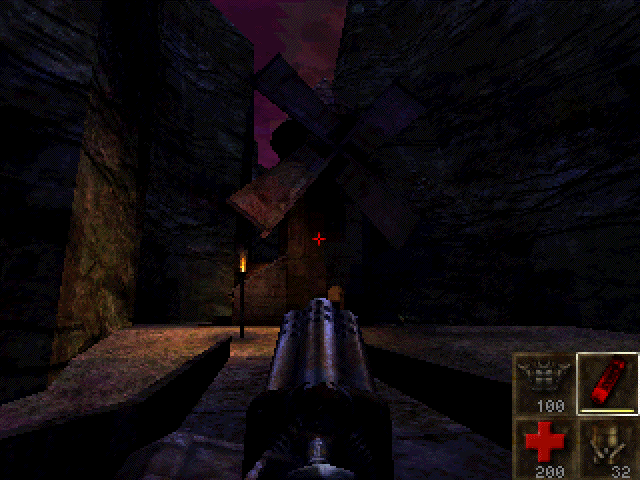
    Unreal, it came out on the PC months ago, set the PC world afire. Now it is out on the Mac, will it do the same? Easy this, of course it will, Unreal is simply the best 1st person shooter ever to appear on any platform. Sure it has some faults. This is the first and only game I have ever made a point to explore everything possible on my first time through. Even without a 3D card the game is stunning, absolutely stunning. It is the best looking game ever.

    Unreal screenshot
    (Click on Picture to Expand)

    Gameplay

    The gameplay is linear and gets fairly repetitive after a while. Kill and hunt for buttons/levers/switches, but then again every game of this type basically boils down to these elements. The AI for the monsters is the best I have seen, they run around, hide and retreat when being pummelled in a one on one. Some of are even bright enough to engage in pretty impressive ambushes and pincer movements. The weaponry on the other hand, looks good but is a bit underpowered. Unreal has a candidate for most useless weapon in a game, the ASMD. Never depend on it, it is pretty useless. There also no, huge nasty weapon, pocket nuke variety. The RezorJack and the Eightball are the most useful and my favourites.

    Unreal seems to me to have more replay value that most games of this ilk. There is suppose to be a Marathon TC for it soon, so the engine will be going for a long time methinks. Another reason that the game will be played over and over again is the fly cheat, this function allows you to fly around the level and see it in all its finery. Well worth it.

    I am unable to play multiplayer because of a rubbish internet connection and few people I know have computers able to handle the monster that is Unreal.

    Unreal screenshot
    (Click on Picture to Expand)

    Graphics and Sound/Interface/Difficulty

    Well there is not much one can say about either, other than wow. Nothing I have ever seen in any genre of game comes close to this. Nothing. There are places where things bleed into each other but that is rare. The music and visuals combine for an amazing ambience with is really apt to drag you in and leave you there. The interface is incredibly good and allows an amazing amount of feedback. While the mouse/keyboard combination is tricky to get used to, once it is mastered it provides incredible game play. Unreal will be a major time suck, even as a solo game.

    The game is not hard to play once you master the controls and know what to look for. The lighting even on the brightest of settings can be hard to deal with at first. Underwater and dark areas are also hard on the eyes. The biggest frustration is jumping up on ledges and the like. One has to perfectly aligned is some cases, this can be a tad annoying. The fly function solves this when you get really bogged down. A two button mouse or joystick would help when it comes to secondary fire, which is control on the keyboard. I have actually been too lazy to find a better more suitable key.

    Bugs

    There are a few annoying ones. Two of the levels I have played, so far, have areas where loading/saving causes the game to crash. Oddly enough this is only an isolated problem. There is some lagging in some of the more crowded rooms as well. This still occurs despite the fact that I am giving the game 96 RAM to run with.

    Unreal screenshot
    (Click on Picture to Expand)

    Conclusion

    Unreal is, well, unreal. It is an amazing game that has no competitors on the Mac. Its big problem is the fact that it requires so much powerful hardware. You cannot play this game is an reasonable fashion on anything less than a G3 with more than 96 RAM. The requirements are almost obscene. Saying that, Mark Adams and company have done a cracking job with this port. It was done quickly and well.

    So basically if you really want to enjoy this game here is what you do: 1. Buy a G3 2. Get as much RAM as you can afford (96+) 3. Get a 3d Card 4. Get a cable modem or a ISDN line 5. get some rich friends who can get all of the above as well.

    Find a copy

    Unreal has been out of print for years, but used copies of the original Mac release still turn up, and some classics have been re-released for modern systems. Search for Unreal on Amazon.

  • Fallout Mac Review (1998)

    Fallout Mac Review (1998)

    This post has affiliate links. If you buy through them, we may earn a small commission at no extra cost to you. Learn more.

    From the archive: this review first ran on the Mac Gaming Alliance (MGA), the Mac games site that lived here on DimensionZ in the late 1990s. It was published September 1998 and is reproduced as originally written. More in the Mac Gaming Alliance archive.

    Publisher MacPlay
    Tested on Performa 5260/100
    Gameplay 5 / 5 apples
    Graphics & Sound 5 / 5 apples
    Interface 4 / 5 apples
    Difficulty 5 / 5 apples
    Bugs 4 / 5 apples
    Overall 4.5 / 5 apples
    Reviewed by Jonathan Dreyer

    You are a vault dweller, your vault is in trouble, their water chip is damaged and it’s up to you to go out into the post-nuclear wasteland and find a new one. Although Fallout is advertised a Role Playing Game, I found it to be more like a hybrid cross between an RPG and an Adventure game, not quite either…

    Gameplay

    Fallout is a very detailed and complex game. Your main quest is to find a new Water Chip for your vault but, in order to accomplish that there are numerous other mini-quests to accomplish. As you travel the wasteland you will come across many different towns or villages, each filled with different types of people, be it Merchants, Police Forces, Gangs, Ghouls, or maybe even some Super-Mutants. One of my favourite parts of the game is all the different weapons you can find, using a flame thrower and watching your enemies be incinerated, or use the laser rifle to slice your enemies in half. I also liked the turn-based combat, so for people like me whose reflexes aren’t the greatest still have a chance to kick some ass in combat!

    Fallout is still mainly a RPG, you can create your own character or use one of the pre-made ones. As you advance in the game your character gains experience points and advances levels by destroying your enemies or completing mini-quests. As you advance your character’s level you are presented with choices of perks that allow your character to for example carry more weight or attack first in combat.

    Graphics & Sound

    The graphics in Fallout are good, not award winning good but still pretty good. I noticed that there were only a few actual “different” character graphics, like you see a guy with a red baseball hat in just about every town. Also, there were only a few different “town” graphic settings, just about all of the walls of just about all of the buildings were the same, I found it a little confusing to remember which building is which.

    The sound effects in Fallout are great! It seemed to me that almost every different gun had a different sound effect. To get the best out of the game I recommend that you use stereo headphones or a good pair of stereo speakers, heck you should do that for EVERY game.

    Interface

    Fallout has a interesting interface, it does not use any of the “Mac” dialog boxes that we are all used to, instead Fallout seems to be completely Operating System independent. I read that Fallout was programed using a platform OS independent programming library. I really hope that more and more game companies will begin to follow Interplay’s example

    Difficulty

    Fallout isn’t that difficult, there are no really complex puzzles or anything but, there are a lot of quests to go through to complete the game. I played about 4 hours a day for just over 2 weeks to complete the game. So I’d estimate that this game would take the average person about 40 to 70 hours to complete but, believe me it’s time well spent.

    Conclusion

    In conclusion, I am glad to see such a high quality game make it to the Mac. I found Fallout to be one of the best games I’ve played all year. It has a complex and rich plot that should provide any normal person with hours of enjoyment.

    Find a copy

    Fallout has been out of print for years, but used copies of the original Mac release still turn up, and some classics have been re-released for modern systems. Search for Fallout on Amazon.

  • Deer Hunter Mac Review (1998)

    Deer Hunter Mac Review (1998)

    This post has affiliate links. If you buy through them, we may earn a small commission at no extra cost to you. Learn more.

    From the archive: this review first ran on the Mac Gaming Alliance (MGA), the Mac games site that lived here on DimensionZ in the late 1990s. It was published August 1998 and is reproduced as originally written, with the original screenshots (click to enlarge). More in the Mac Gaming Alliance archive.

    Publisher MacSoft
    Tested on PowerMac 8600/300 w/32 mb RAM
    Gameplay 5 / 5 apples
    Graphics & Sound 3.5 / 5 apples
    Interface 4 / 5 apples
    Difficulty 4 / 5 apples
    Bugs 4 / 5 apples
    Overall 4 / 5 apples
    Reviewed by Jonathan Dreyer

    When Deer Hunter was announced for the Mac by MacSoft it caused a bit of a stir in the Mac gaming community, some people even thought it was a joke. I know I thought “a Hunting simulation?!, they’ve got to be kidding!”, but after playing it I understood why it was a best-seller on the “other” side before coming to the Mac. Deer Hunter is a fun, enjoyable, and not to mention addicting game.

    Deer Hunter screenshot
    (Click on Picture to Expand)

    Gameplay

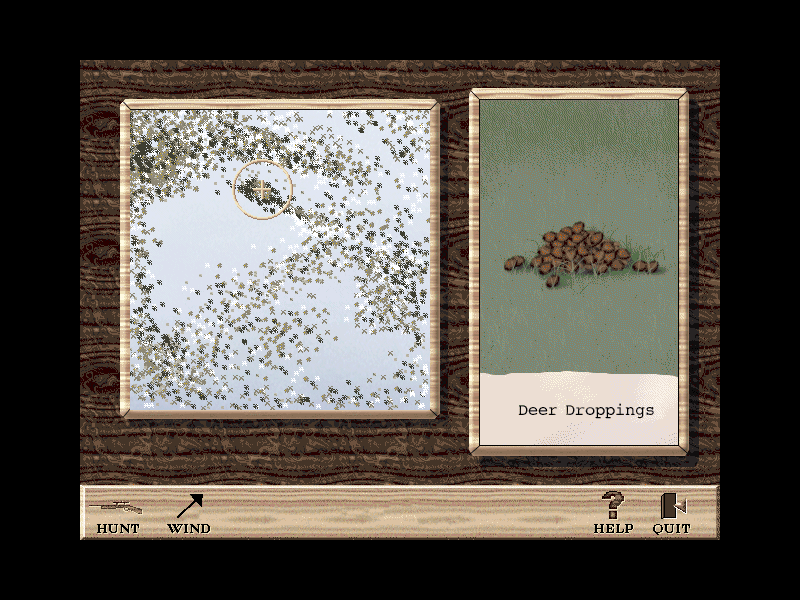
    Deer Hunter is a surprisingly simple game to learn yet very difficult to master. When you go hunting you have a choice between three weapons, a Rifle with scope, a 4-Shot Shotgun, and a Compound Bow. After you choose your preferred weapon you should go to the shooting range to practice before heading out on the hunt. Before you can go out hunting you have to decide on three options, whether you want to use a tree stand and hunt from in a tree, whether or not you wish to use an attracting scent, and whether or not you would like to use a cover scent to mask your bodily odors. When just starting out I recommended that you use all 3 options to lower the difficulty of bagging a deer, once you get more experienced the real fun comes from hunting without those aforementioned hunting peripherals. Once you have geared up for the hunt you can choose between 3 different areas to hunt from, an Indiana winter land, Colorado Alpine forests, and Arkansas autumn woodlands. Each area has it’s own advantages and disadvantages, my personal favorite being the Indiana winter land as it seems to have the large bucks. While hunting you have a deer call, an antler rattle, and binoculars to aid you. As soon as a buck comes into view you have to aim quickly and hope your first shot is good because you most likely won’t get another one.

    Deer Hunter screenshot
    (Click on Picture to Expand)

    Graphics and Sound

    The graphics in Deer Hunter are life like, although not as detailed as I would have hoped. The backgrounds reuse the same five or six trees and bushes over and over again. The grounds itself looks like a jpeg graphic that was tiled over the entire hunting area. The Deer, while graphically the most realistic part of the game, seemed to move very jerky and unnaturally. Overall the graphics are decent although somewhat mediocre in parts, you get what you pay for in this bargain priced twenty-dollar title.

    The sound of the forests in Deer Hunter are very life-like and realistic, you could almost close your eyes and imagine actually outside in a forest hunting deer. I quickly became annoyed with the hunter’s comments though, he only has a few different parts to say but he never seems to stop saying them, he says them over and over and over.

    Deer Hunter screenshot
    (Click on Picture to Expand)

    Difficulty

    Deer Hunter has no difficulty level per-say, but by utilizing the options of tree stand, attracting scent, and cover scent, you can greatly change the difficulty of the hunt. The problem with that is that the hunt then become either easy or hard, there is no medium difficulty. There are cheat codes for Deer Hunter but I won’t post them here because this is game I don’t believe anyone should cheat in as it completely takes the fun away.

    Deer Hunter screenshot
    (Click on Picture to Expand)

    Conclusion

    In Conclusion, Deer Hunter, although an unusual game these days, is unbelievably fun and amazingly addicting. Once you start playing Deer Hunter you want to keep on playing, always in search of the seemingly impossible to find 15 point size buck.

    I recommend this cheap bargain title to just about everybody except animal rights supporters. You should defiantly check this game out.

    Find a copy

    Deer Hunter has been out of print for years, but used copies of the original Mac release still turn up, and some classics have been re-released for modern systems. Search for Deer Hunter on Amazon.

  • Real Pool Mac Review (1998)

    Real Pool Mac Review (1998)

    This post has affiliate links. If you buy through them, we may earn a small commission at no extra cost to you. Learn more.

    From the archive: this review first ran on the Mac Gaming Alliance (MGA), the Mac games site that lived here on DimensionZ in the late 1990s. It was published August 1998 and is reproduced as originally written, with the original screenshots (click to enlarge). More in the Mac Gaming Alliance archive.

    Publisher MacSoft
    Tested on PowerMac 8600/300 w/32 mb RAM
    Gameplay 3 / 5 apples
    Graphics & Sound 4 / 5 apples
    Interface 3.5 / 5 apples
    Difficulty 2.5 / 5 apples
    Bugs 4 / 5 apples
    Overall 3.5 / 5 apples
    Reviewed by Jonathan Dreyer

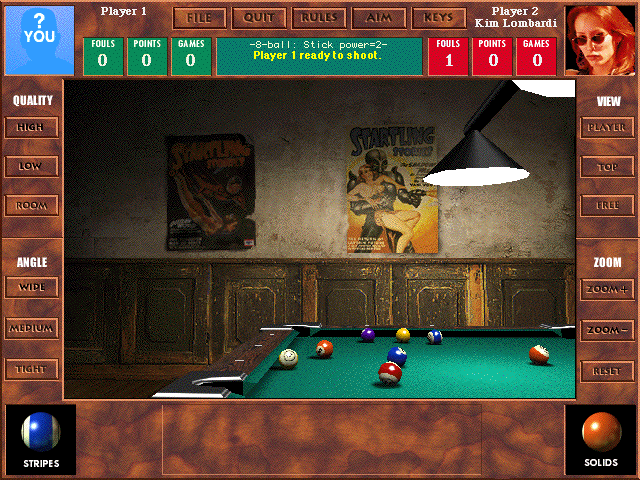
    Real Pool is one of MacSoft’s product that isn’t just aimed at the hard-core gamer. Real Pool contains all the elements that should make it a very fun game to play, but instead I found it average and at time mediocre. Real Pool does offer enjoyable variety and a lot of bang for your buck at it’s cheap suggested price tag of $29.99

    Real Pool screenshot
    (Click on Picture to Expand)

    Gameplay

    Real Pool offers you 6 different Pool games to test your skills at: 8-Ball, 9-Ball, Straight, Rotation, Carom (Spanish) Billiards, and Bumper Pool. When I sat down to play the only Pool Game I really knew how to play was 8-Ball, now I know how to play all 6 different games.

    • 8-Ball: You must pocket all of your balls either solids or stripes. After you have pocketed all of your balls you must then pocket the 8-ball to win the game.
    • 9-Ball: The cue ball must always strike the lowest-numbered ball on the table before striking any other balls, but you may use the lowest ball to pocket any other ball on the table. You win by pocketing the nine ball with a legal shot.
    • Straight: Pocket Balls, one at a time, in any order to score points. The first player to reach 150 points wins.
    • Rotation: Pocket Balls to score more points than your opponent. Each ball’s value in terms of points corresponds to it’s number. The first player to reach 61 points wins.
    • Carom Billiards: Score points by striking both the red ball and the other player’s cue ball with your own cure ball. First player to 30 points wins.
    • Bumper Pool: Pocket your 5 balls before your opponent pockets their’s.

    Real Pool advertises “realistic physics”, I found the physics of the game to be on the most part realistic until it came to the actual sinking of the ball, I found that the pockets were rather “loose” in letting shots in, about half the shots sunk wouldn’t have gone in in real life.

    Real Pool also supports the obligatory Multiplayer option, allowing people to play against each other on the same computer or over the internet. I tried the multiplayer option a few times but found that I preferred the variety of different computer opponents.

    Real Pool screenshot
    (Click on Picture to Expand)

    Graphics and Sound

    Real Pool does live up to it’s claim of 3D photo-realistic graphics. As you can see in the screen shots, in graphical terms this is the most realistic pool game I’ve ever seen. One word of warning, on slower Power Macs the graphics can really slow down the game requiring you to switch to the lower graphics setting which makes the balls look very blocky and pixilated.

    I had some problem’s with the music in RP. At times the music became very annoying and often distracting, but turning off the music made the game seem sort of eerie and weird.

    Real Pool screenshot
    (Click on Picture to Expand)

    Difficulty

    Real Pool has great variety in it’s difficulty by allowing you to choose from many different opponents. Each opponent has different skills and favors different shots. No two opponents are alike. You have never truly mastered a game until you have played and beaten all of the opponents.

    Real Pool screenshot
    (Click on Picture to Expand)

    Conclusion

    In Conclusion, Real Pool is the best pool simulator available for the Macintosh, although that’s not saying much because it’s only competitors are MacPlay’s Virtual Pool and a few shareware games.

    If want to play pool on your computer this game is for you because nothing else out there can match it in terms of variety and features.

    Find a copy

    Real Pool has been out of print for years, but used copies of the original Mac release still turn up, and some classics have been re-released for modern systems. Search for Real Pool on Amazon.