DimensionZ

Tag: Simulation Games

  • Rocky Mountain Trophy Hunter Mac Review (1999)

    Rocky Mountain Trophy Hunter Mac Review (1999)

    This post has affiliate links. If you buy through them, we may earn a small commission at no extra cost to you. Learn more.

    From the archive: this review first ran on the Mac Gaming Alliance (MGA), the Mac games site that lived here on DimensionZ in the late 1990s. It was published around 1999 and is reproduced as originally written, with the original screenshots (click to enlarge). More in the Mac Gaming Alliance archive.

    Publisher MacSoft
    Tested on PowerMac G3 233 130 RAM (VM on)
    Overall 2 / 5 apples
    Reviewed by Marty Dodge

    Rocky Mountain Trophy Hunter, with even more locations to shoot virtual game, is the follow-up to blindingly dull Deer Hunter. (The game not the movie.) Macsoft claims that the original is a top five selling game for the Mac. Quickly following the release of DH, this just in time for Christmas sequel, promises more guns and more types of game to track and hunt. Included with the game is an insert with all of the hunting and fishing titles published by Wizworks, presumably all of these games, including Deer Hunter II will make it to the Mac if DH and TH do well.

    Rocky Mountain Trophy Hunter screenshot
    (Click on Picture to Expand)

    Trophy Hunter: Interactive Big Game Hunting, has got to be the second dullest game ever created for any platform (Deer Hunter being the first). The point of this game is to track and shoot big game. You can use a rifle, shotgun, bow, muzzle-loader or six shot revolver to kill big horn sheep, bear elk and moose. The practice area is now included in the hunting screen, so you can practice your aim, with any of the weapons featured. There is a constant chatter from a coach who compliments or criticizes your aim. Of course being on a computer there is no feedback from the weapon. There is no feel for the kick of the pistol or shotgun nor is there the feeling of release when the arrows leaves the bow. Maybe Deer Hunter II should be a candidate for “force feedback” add-ons.

    Rocky Mountain Trophy Hunter screenshot
    (Click on Picture to Expand)

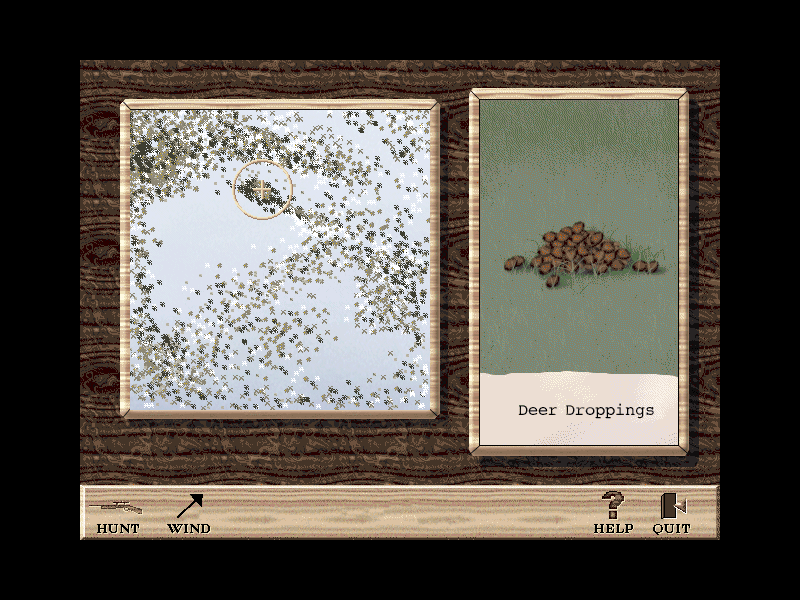
    The only realism in this game is the long wait for an animal to come into your sights. You can help yourself with the aid of a call, bait and musk. There is also a choice of using a stand to sit on and. If the rifle scope is not enough for you, there are binoculars and a spotting scope to help you find prey. In addition to the “Tools of the Trade” the aerial maps contain hot spots, a compass and wind indicator, and things like tracks, markings, blood trails and rubbing areas. When and if you hit anything it is recorded in a Trophy Room, with the head of an animal and a description.

    Rocky Mountain Trophy Hunter screenshot
    (Click on Picture to Expand)

    The graphics are basic although if you are unlucky you can encounter climate and extreme weather, the sounds are basic, if accurate. Because the game is so basic and simple the requirements are pretty low. PowerMac, OS 7.1, 16 RAM, color monitor and 80 MHz or faster. As with Deer Hunter, the low requirements and lack of high-tech graphics mean there are no obvious bugs.

    Rocky Mountain Trophy Hunter screenshot
    (Click on Picture to Expand)

    One good thing about this otherwise dullard of a game is the fact that some of the proceeds of the game will be donated to Wildlife Forever, an organisation dedicated to maintaining America’s wildlife heritage, a noble cause indeed.

    Rocky Mountain Trophy Hunter screenshot
    (Click on Picture to Expand)

    Find a copy

    Rocky Mountain Trophy Hunter has been out of print for years, but used copies of the original Mac release still turn up, and some classics have been re-released for modern systems. Search for Rocky Mountain Trophy Hunter on Amazon.

  • Starfleet Academy Mac Review (1998)

    Starfleet Academy Mac Review (1998)

    This post has affiliate links. If you buy through them, we may earn a small commission at no extra cost to you. Learn more.

    From the archive: this review first ran on the Mac Gaming Alliance (MGA), the Mac games site that lived here on DimensionZ in the late 1990s. It was published October 1998 and is reproduced as originally written. More in the Mac Gaming Alliance archive.

    Publisher MacPlay
    Tested on Performa 5260/100 Mhz and a PowerMac 8600/300
    Gameplay 5 / 5 apples
    Graphics & Sound 5 / 5 apples
    Interface 4 / 5 apples
    Difficulty 4 / 5 apples
    Bugs 4 / 5 apples
    Overall 4 / 5 apples
    Reviewed by Jonathan Dreyer

    Note:(Feb 2/98)

    On my new PowerMac 8600/300 I can play SFA with all options and sounds on (i had to have VM on as I only have 32 megs of RAM) and it played great! Smooth as can be!

    “Take a seat in the captain’s chair as the USS Enterprise warps into space. Starfleet Academy allows the player to command 4 Federation class ships in combat against thirty 3-D rendered space ships from a cloaked Klingon™ Bird of Prey™ to a Romulan™ heavy cruiser. Reprising their original STAR TREK roles, William Shatner as Captain Kirk, Walter Koenig as Commander Chekov and special appearance by George Takei as Captain Sulu appear in full-motion video and interact with the player as never before. A original music score by Ron Jones and the script-writing talents of Dan Greenberg, Andrew Greenberg, Bill Bridge, Sandy Fries, and Star Trek novelist Diane Carey make Starfleet Academy a truly galactic experience.” — Interplay PR

    Gameplay

    Starfleet Academy has an unusual interface. It successfully combines an adventure game with an action simulation. Before each mission you are usually presented with a video where at certain points you have to choose what your character says, these segments will greatly affect the outcome of the game so you must be very careful when you select. Following the the video segment is your mission, in each mission you will be given a list of objectives to complete before you head back to the Starbase. Sounds simple, yes? No, not only do you have to be a great combat pilot to complete the mission, you have to think like a Starfleet captain, starfleet’s orders are not always right, to complete the mission you have to find the right way to complete the objectives, you may have to take the mission a few times.

    I suggest that you use a joystick for the combat simulation segments. The combat segments are usually very fast paced, you must react very quickly to defeat your foes. The key to winning in battles is setting your damage and energy levels for combat before you actually get into combat, to end your battles quickly give your phasers as much power as possible.

    Interface

    Although Starfleet Academy’s interface is very intuitive, I have one complaint: I can’t find one Mac-like dialog box anywhere in the game, it uses completely graphical buttons. Other than that, I loved the Interface.

    Difficulty

    SFA allows you to select from the standard 3 different difficulty settings. On the first difficulty setting, “Plebe”, you shouldn’t have any trouble completing the game, that’s why I strongly suggest that you play on the medium difficulty setting.

    Bugs

    I have only encountered one bug: in the second mission with you have voices turned off the game would crash. I promptly sent in e-mail to MacPlay’s tech support and received a reply 2 days later. To get around this bug they told me to turn on voices for just that level, and viola…

    Conclusion

    In conclusion, Starfleet Academy is a great game that will give you hours of enjoyment. I must note one caveat, the system requirements: they’re pretty hefty:

    80 Mhz PowerPC or better
    25
    megabytes of RAM FREE

    First of all, 80 Mhz doesn’t cut it. Anything less than about 180 Mhz will require you to turn down the graphic option. As for the RAM, the game will run with Virtual Memory or RAM Doubler activated but the video segments will be VERY choppy.

    So I say, if your machine can run this game, you will love it even if you don’t like Star Trek.

    Find a copy

    Starfleet Academy has been out of print for years, but used copies of the original Mac release still turn up, and some classics have been re-released for modern systems. Search for Starfleet Academy on Amazon.

  • Deer Hunter Mac Review (1998)

    Deer Hunter Mac Review (1998)

    This post has affiliate links. If you buy through them, we may earn a small commission at no extra cost to you. Learn more.

    From the archive: this review first ran on the Mac Gaming Alliance (MGA), the Mac games site that lived here on DimensionZ in the late 1990s. It was published August 1998 and is reproduced as originally written, with the original screenshots (click to enlarge). More in the Mac Gaming Alliance archive.

    Publisher MacSoft
    Tested on PowerMac 8600/300 w/32 mb RAM
    Gameplay 5 / 5 apples
    Graphics & Sound 3.5 / 5 apples
    Interface 4 / 5 apples
    Difficulty 4 / 5 apples
    Bugs 4 / 5 apples
    Overall 4 / 5 apples
    Reviewed by Jonathan Dreyer

    When Deer Hunter was announced for the Mac by MacSoft it caused a bit of a stir in the Mac gaming community, some people even thought it was a joke. I know I thought “a Hunting simulation?!, they’ve got to be kidding!”, but after playing it I understood why it was a best-seller on the “other” side before coming to the Mac. Deer Hunter is a fun, enjoyable, and not to mention addicting game.

    Deer Hunter screenshot
    (Click on Picture to Expand)

    Gameplay

    Deer Hunter is a surprisingly simple game to learn yet very difficult to master. When you go hunting you have a choice between three weapons, a Rifle with scope, a 4-Shot Shotgun, and a Compound Bow. After you choose your preferred weapon you should go to the shooting range to practice before heading out on the hunt. Before you can go out hunting you have to decide on three options, whether you want to use a tree stand and hunt from in a tree, whether or not you wish to use an attracting scent, and whether or not you would like to use a cover scent to mask your bodily odors. When just starting out I recommended that you use all 3 options to lower the difficulty of bagging a deer, once you get more experienced the real fun comes from hunting without those aforementioned hunting peripherals. Once you have geared up for the hunt you can choose between 3 different areas to hunt from, an Indiana winter land, Colorado Alpine forests, and Arkansas autumn woodlands. Each area has it’s own advantages and disadvantages, my personal favorite being the Indiana winter land as it seems to have the large bucks. While hunting you have a deer call, an antler rattle, and binoculars to aid you. As soon as a buck comes into view you have to aim quickly and hope your first shot is good because you most likely won’t get another one.

    Deer Hunter screenshot
    (Click on Picture to Expand)

    Graphics and Sound

    The graphics in Deer Hunter are life like, although not as detailed as I would have hoped. The backgrounds reuse the same five or six trees and bushes over and over again. The grounds itself looks like a jpeg graphic that was tiled over the entire hunting area. The Deer, while graphically the most realistic part of the game, seemed to move very jerky and unnaturally. Overall the graphics are decent although somewhat mediocre in parts, you get what you pay for in this bargain priced twenty-dollar title.

    The sound of the forests in Deer Hunter are very life-like and realistic, you could almost close your eyes and imagine actually outside in a forest hunting deer. I quickly became annoyed with the hunter’s comments though, he only has a few different parts to say but he never seems to stop saying them, he says them over and over and over.

    Deer Hunter screenshot
    (Click on Picture to Expand)

    Difficulty

    Deer Hunter has no difficulty level per-say, but by utilizing the options of tree stand, attracting scent, and cover scent, you can greatly change the difficulty of the hunt. The problem with that is that the hunt then become either easy or hard, there is no medium difficulty. There are cheat codes for Deer Hunter but I won’t post them here because this is game I don’t believe anyone should cheat in as it completely takes the fun away.

    Deer Hunter screenshot
    (Click on Picture to Expand)

    Conclusion

    In Conclusion, Deer Hunter, although an unusual game these days, is unbelievably fun and amazingly addicting. Once you start playing Deer Hunter you want to keep on playing, always in search of the seemingly impossible to find 15 point size buck.

    I recommend this cheap bargain title to just about everybody except animal rights supporters. You should defiantly check this game out.

    Find a copy

    Deer Hunter has been out of print for years, but used copies of the original Mac release still turn up, and some classics have been re-released for modern systems. Search for Deer Hunter on Amazon.

  • Real Pool Mac Review (1998)

    Real Pool Mac Review (1998)

    This post has affiliate links. If you buy through them, we may earn a small commission at no extra cost to you. Learn more.

    From the archive: this review first ran on the Mac Gaming Alliance (MGA), the Mac games site that lived here on DimensionZ in the late 1990s. It was published August 1998 and is reproduced as originally written, with the original screenshots (click to enlarge). More in the Mac Gaming Alliance archive.

    Publisher MacSoft
    Tested on PowerMac 8600/300 w/32 mb RAM
    Gameplay 3 / 5 apples
    Graphics & Sound 4 / 5 apples
    Interface 3.5 / 5 apples
    Difficulty 2.5 / 5 apples
    Bugs 4 / 5 apples
    Overall 3.5 / 5 apples
    Reviewed by Jonathan Dreyer

    Real Pool is one of MacSoft’s product that isn’t just aimed at the hard-core gamer. Real Pool contains all the elements that should make it a very fun game to play, but instead I found it average and at time mediocre. Real Pool does offer enjoyable variety and a lot of bang for your buck at it’s cheap suggested price tag of $29.99

    Real Pool screenshot
    (Click on Picture to Expand)

    Gameplay

    Real Pool offers you 6 different Pool games to test your skills at: 8-Ball, 9-Ball, Straight, Rotation, Carom (Spanish) Billiards, and Bumper Pool. When I sat down to play the only Pool Game I really knew how to play was 8-Ball, now I know how to play all 6 different games.

    • 8-Ball: You must pocket all of your balls either solids or stripes. After you have pocketed all of your balls you must then pocket the 8-ball to win the game.
    • 9-Ball: The cue ball must always strike the lowest-numbered ball on the table before striking any other balls, but you may use the lowest ball to pocket any other ball on the table. You win by pocketing the nine ball with a legal shot.
    • Straight: Pocket Balls, one at a time, in any order to score points. The first player to reach 150 points wins.
    • Rotation: Pocket Balls to score more points than your opponent. Each ball’s value in terms of points corresponds to it’s number. The first player to reach 61 points wins.
    • Carom Billiards: Score points by striking both the red ball and the other player’s cue ball with your own cure ball. First player to 30 points wins.
    • Bumper Pool: Pocket your 5 balls before your opponent pockets their’s.

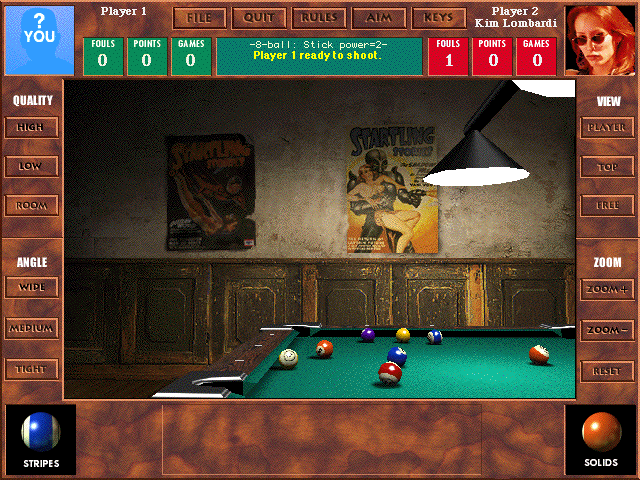
    Real Pool advertises “realistic physics”, I found the physics of the game to be on the most part realistic until it came to the actual sinking of the ball, I found that the pockets were rather “loose” in letting shots in, about half the shots sunk wouldn’t have gone in in real life.

    Real Pool also supports the obligatory Multiplayer option, allowing people to play against each other on the same computer or over the internet. I tried the multiplayer option a few times but found that I preferred the variety of different computer opponents.

    Real Pool screenshot
    (Click on Picture to Expand)

    Graphics and Sound

    Real Pool does live up to it’s claim of 3D photo-realistic graphics. As you can see in the screen shots, in graphical terms this is the most realistic pool game I’ve ever seen. One word of warning, on slower Power Macs the graphics can really slow down the game requiring you to switch to the lower graphics setting which makes the balls look very blocky and pixilated.

    I had some problem’s with the music in RP. At times the music became very annoying and often distracting, but turning off the music made the game seem sort of eerie and weird.

    Real Pool screenshot
    (Click on Picture to Expand)

    Difficulty

    Real Pool has great variety in it’s difficulty by allowing you to choose from many different opponents. Each opponent has different skills and favors different shots. No two opponents are alike. You have never truly mastered a game until you have played and beaten all of the opponents.

    Real Pool screenshot
    (Click on Picture to Expand)

    Conclusion

    In Conclusion, Real Pool is the best pool simulator available for the Macintosh, although that’s not saying much because it’s only competitors are MacPlay’s Virtual Pool and a few shareware games.

    If want to play pool on your computer this game is for you because nothing else out there can match it in terms of variety and features.

    Find a copy

    Real Pool has been out of print for years, but used copies of the original Mac release still turn up, and some classics have been re-released for modern systems. Search for Real Pool on Amazon.

  • A-10 Cuba! Mac Review (1998)

    A-10 Cuba! Mac Review (1998)

    This post has affiliate links. If you buy through them, we may earn a small commission at no extra cost to you. Learn more.

    From the archive: this review first ran on the Mac Gaming Alliance (MGA), the Mac games site that lived here on DimensionZ in the late 1990s. It was published around 1998 and is reproduced as originally written. More in the Mac Gaming Alliance archive.

    Publisher Parsoft
    Tested on Performa 5260/100 Mhz
    Gameplay 4 / 5 apples
    Graphics & Sound 3 / 5 apples
    Interface 4 / 5 apples
    Difficulty 5 / 5 apples
    Bugs 4 / 5 apples
    Overall 4 / 5 apples
    Reviewed by Jonathan Dreyer

    Guerrilla forces have taken control of the beautiful island of Cuba! Once again the A-10 Wathogs must suppress the enemies of freedom. A-10 Cuba adds more action packed missions and new features to the award winning A-10 Attack! Defend the run down Naval Air Station at Guantanamo Bay, escort damaged aircraft over heavily defended occupied territory, and then destroy the precious resources which fuel the enemy war machine. Transform aircraft and tanks into piles of smokin’ garbage with the largest airborne arsenal available to mankind.

    Gameplay

    First off I’ll tell you what I didn’t like about A-10 Cuba. First of all, A-10 Cuba isn’t really a game, you don’t earn points or awards it’s a REAL simulation, at the end of the mission you land if you want to and select end game unlike F/A-18 Hornet where after you land it gives you a screen showing that you successfully completed the mission and show what you destroyed. Now what I liked, I really like it’s realistic flight engine, I believe this is the most realistic flight simulator I have EVER played now mind you I’ve never actually flown a plane but, of all the books I’ve read and simulators I’ve flown, this is still the most realistic.

    Interface, Difficulty, and Reliability

    Since this is a mac first game not a port the interface is very Macish, it has all the options, dialogue boxes, and buttons you aspect in a mac game. It has all sorts of difficulty options, graphic options, sound options, and more of the usual.

    I found A-10 Cuba very difficult to master, it has I very steep learning curve and lots of buttons. As for the missions, I found those very interesting although not much new to a flight sim veteran.

    A-10 Cuba is very replayible in the Network mode, if your not connect to a network you can use a program like NetLink Remote or ARA to play a modem game.

    Conclusion

    In conclusion A-10 Cuba is a excellent simulator but a bad game, if you want a simulator this is what to get, if you want a game then I suggest F/A-18 Hornet.

    Find a copy

    A-10 Cuba! has been out of print for years, but used copies of the original Mac release still turn up, and some classics have been re-released for modern systems. Search for A-10 Cuba! on Amazon.