DimensionZ

Author: Jon

  • Duke Nukem 3D Mac Review (1998)

    Duke Nukem 3D Mac Review (1998)

    This post has affiliate links. If you buy through them, we may earn a small commission at no extra cost to you. Learn more.

    From the archive: this review first ran on the Mac Gaming Alliance (MGA), the Mac games site that lived here on DimensionZ in the late 1990s. It was published March 1998 and is reproduced as originally written. More in the Mac Gaming Alliance archive.

    Publisher Macsoft
    Tested on Performa 5260/100 Mhz
    Gameplay 5 / 5 apples
    Graphics & Sound 3 / 5 apples
    Interface 4 / 5 apples
    Difficulty 5 / 5 apples
    Bugs 4 / 5 apples
    Overall 4 / 5 apples
    Reviewed by Jonathan Dreyer

    You are DukeNukem, ready to kick some alien butts! Aliens have invaded LA and it’s up to you to wipem out!

    Gameplay

    I really enjoyed the gameplay of Duke. There’s 4 different episodes each with 7 to 11 levels and different plots. I think the best feature of this game is the interaction with Duke’s environment. Opening doors, shooting holes in the wall, blowing up toilets and garbage cans, riding subway trains, and handing money to the exotic dancers (making them strip) are just some of the cool things you can do with Duke you can also relieve yourself in the toilet. It’s a standard 3D shootem up game, you use the arrow keys to move around, fire, crouch, jump, use items such as a Jetpak or steroids. In each level there are many different guns and aliens to pick up and wipe out. I think the best part of Duke is the sound effects, the sounds are great this has the best sound effects of any Shootem up game I’ve played. But where Duke excels in sound it lacks in graphics, Duke was a straight Mac port which means the graphics weren’t redone like LucasArts did for DarkForces and therefor the graphics in Duke look very blocky.

    Interface, Difficulty, and Reliability

    Lion did a good job of porting Duke, all the options have Mac dialogue boxes unlike Doom. Changing the controls, sound, and difficulty is very very simple.

    I found Duke Nukem refreshingly challenging compared to Doom and DarkForces, if you had trouble finishing Dark Forces or Doom then this isn’t the game for you.

    You can play Duke Nukem an infinite amount of times using 3rd party maps and/or playing multiplayer games. It’s very fun playing multiplayer games knowing you’re playing against a real person.

    Conclusion

    In conclusion Duke Nukem 3D is a very good game. I would recommend buying it unless, you don’t buy that many games and have a high end PPC Mac in which case I would say wait for MacQuake.

    Find a copy

    Duke Nukem 3D has been out of print for years, but used copies of the original Mac release still turn up, and some classics have been re-released for modern systems. Search for Duke Nukem 3D on Amazon.
  • Deadlock Mac Review (1998)

    Deadlock Mac Review (1998)

    This post has affiliate links. If you buy through them, we may earn a small commission at no extra cost to you. Learn more.

    From the archive: this review first ran on the Mac Gaming Alliance (MGA), the Mac games site that lived here on DimensionZ in the late 1990s. It was published March 1998 and is reproduced as originally written, with the original screenshots (click to enlarge). More in the Mac Gaming Alliance archive.

    Publisher Macsoft
    Tested on LC 475
    Gameplay 3 / 5 apples
    Graphics & Sound 4 / 5 apples
    Interface 3 / 5 apples
    Difficulty 5 / 5 apples
    Bugs 5 / 5 apples
    Overall 4 / 5 apples
    Reviewed by Ben Kilford

    Beneath you floats the untamed Gallius 5. A newly discovered planet in the disputed part of the galaxy. A colony ship is ready, equipped with all the basics you need to settle on this planet. The select group of colonists orbiting with you are prepared both to build a strong colony and defend it to the last stone.

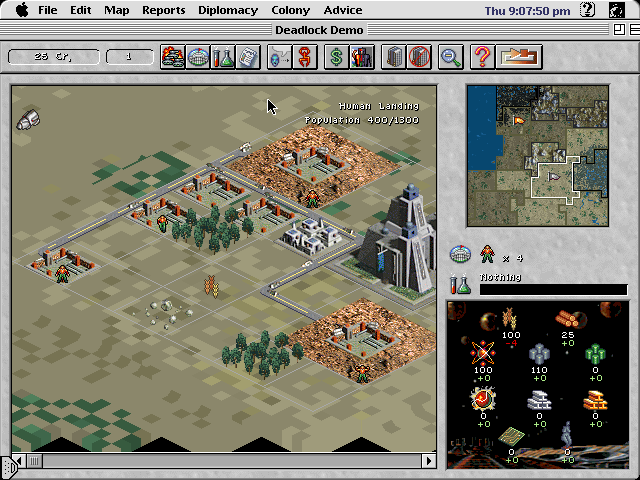
    Deadlock screenshot(Click to Expand)

    Game Play

    The game play is pretty good you lead a group of colonists in a fight for a planet. You can have unlimited play which you set up however you like. For example you choose the number of other colonies fighting for the planet and how many city centers are to be built to win. Mac Soft have put in a very useful tutorial which will show you the basics. You use a mouse to do most of the controlling, such as building and to attack you enemy. As you expand your territory you will encounter your enemy and may have to go to war. The one thing that I did not like is you have to end your turn to make progress instead of it doing it automatically.

    Deadlock screenshot(Click to Expand)

    Graphics and Sound

    The introductory graphics are excellent because they are realistic, they show you what the planet looks like and introduces the Characters. When the game starts the graphics become less impressive, they are not as realistic and the characters lack detail. The sound effects are quite pleasing, particularly the squeeks and beeps. However the background music becomes annoying because of constant repetition.

    Interface

    I liked the way the interface was laid out. Your menu bar is at the top of the screen and a simple click will activate each box.

    Difficulty & Bugs

    The level of play ranges from novice to expert. Players can play against the computer or on a network of computers. The level of difficulty depends on the number of city centers to be built and the number of Characters activated. There were no bugs that I was aware of during the time I used this program.

    Deadlock screenshot(Click to Expand)

    Conclusion

    I enjoyed playing Deadlock. There was a lot to do during the game. I feel it is rather similar to SimCity but better. I rather like the feature that allows one to fight against their enemy. This is an excellent building and alien busting game full of technology and some new design methods.

    Find a copy

    Deadlock has been out of print for years, but used copies of the original Mac release still turn up, and some classics have been re-released for modern systems. Search for Deadlock on Amazon.

  • Carmageddon Mac Review (1998)

    Carmageddon Mac Review (1998)

    This post has affiliate links. If you buy through them, we may earn a small commission at no extra cost to you. Learn more.

    From the archive: this review first ran on the Mac Gaming Alliance (MGA), the Mac games site that lived here on DimensionZ in the late 1990s. It was published March 1998 and is reproduced as originally written. More in the Mac Gaming Alliance archive.

    Publisher SCi
    Tested on Performa 5260/100 Mhz and a PowerMac 8600/300
    Gameplay 5 / 5 apples
    Graphics & Sound 4 / 5 apples
    Interface 4 / 5 apples
    Difficulty 5 / 5 apples
    Bugs 5 / 5 apples
    Overall 5 / 5 apples
    Reviewed by Jonathan Dreyer

    Note:(Feb 2/98)

    On my new PowerMac 8600/300 I can play Carmageddon in High-Res 640*480 and it’s completely smooth, absolutely no jerkiness at all!

    Carmageddon

    First of all, this is the BEST game I have played for a very long time! I’ve had more fun playing this game than any other in the this year. Now for something about the game: The Nastiest Driving Game in the World.. Ever! Pit your wits and wheels against 25 maniac drivers over 36 formidable race circuits in your quest to become the King of Carnage and the Prince of the Pile-up! Carmageddon.. it’s murder on the streets

    Gameplay

    I have to say that the gameplay is the most enjoyable part of the game! There are 2 ways to finish a race, you can either go through the race and complete the laps or you can just go around smashing all the other cars, the latter being much more enjoyable. During the race you have a timer at the tops of the screen that counts down to zero, to increase the time on the timer you either run over some people and get some blood splatter or ram the other cars until they are destroyed and you get credits and time. A variety of tracks and opponents keep the game very very fun during the 36 races.

    Graphics and Sound

    The second great thing about this game are the graphics and sound. The High-Res 640*480 graphics are absolutely fabulous, the only problem is that Carmageddon doesn’t support any 3D cards (yet?) so unless you have a very very fast processor, you’re stuck in Low-Res which thankfully is still great and playable on most PowerMacs.

    The sound effects in Carmageddon are wonderful, the screams and shrieks of people just before you run them down are hilarious. The music is also fantastic!

    Interface, Difficulty, and Reliability

    You can tell as soon as you start the game that this is a PC port. All of the menus and settings screen are similar to a PC games there are no Mac-like dialogue boxes in this game but, even though the game’s interface is still good, especially with the bloody hand cursor.

    I found that they difficulty of the different races to be either very easy or very hard, in some races it took me 4 tries to hit something before my low low starting time ran down.

    As for reliability, the game never crashed on my at all, a very rare thing indeed.

    Conclusion

    In conclusion, I recommend this game. If your computer can run it at a reasonable speed then this game is excellent! I have absolutely no complaints about this game.

    Find a copy

    Carmageddon has been out of print for years, but used copies of the original Mac release still turn up, and some classics have been re-released for modern systems. Search for Carmageddon on Amazon.

  • X-Men: Ravages of the Apocalypse Mac Review (1998)

    X-Men: Ravages of the Apocalypse Mac Review (1998)

    This post has affiliate links. If you buy through them, we may earn a small commission at no extra cost to you. Learn more.

    From the archive: this review first ran on the Mac Gaming Alliance (MGA), the Mac games site that lived here on DimensionZ in the late 1990s. It was published January 1998 and is reproduced as originally written. More in the Mac Gaming Alliance archive.

    Publisher MacSoft
    Tested on PowerMac w/Power3D
    Gameplay 5 / 5 apples
    Graphics & Sound 5 / 5 apples
    Interface 5 / 5 apples
    Difficulty 4 / 5 apples
    Bugs 3 / 5 apples
    Overall 5 / 5 apples
    Reviewed by David Leinbach

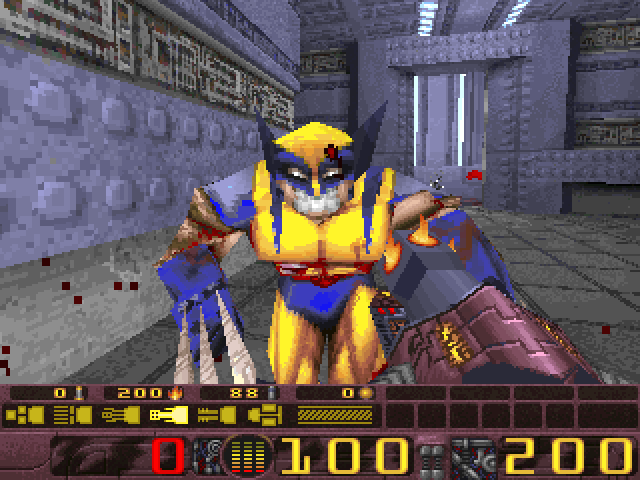
    X-Men: Ravages of the Apocalypse is the prefect add-on to Quake, it adds what Quake lacks, a PLOT! This is a TOTAL conversion for Quake, that means that everything is new, all-new weapons, sound effects, music, and enemies

    Gameplay

    As I mentioned, this game has a plot, a rather complex one at that. The Evil Apocalypse has cloned the X-Men into his own personal army for world domination. Where do you come into this? Magneto, while no friend of the X-Men, created you, an advanced cyborg to thwart Apocalypse’s evil plans. As a cyborg, your forearms morph into 7 all-new advanced weapons to be used against the sinister X-Clones. There are 12 different X-Men will be fighting, Archangel, Beast, Bishop, Cannonball, Cyclops, Gambit, Iceman, Phoenix, Psylocke, Rogue, Storm, and Wolverine. Of course all the X-Clones have their powerful mutant powers to use against you, i.e. when fighting Wolverine make sure that he is REALLY dead, otherwise his mutant healing factor will bring him back to surprise you.

    There are 18 levels in Ravages, each one is unique with it’s own puzzles and setting. There’s a real plot to follow and goals to achieve in every level.

    Without a doubt, multiplayer X-Men is WAY better than plain old multiplayer Quake. In Multiplayer X-Men you can play any of the 12 X-Men and use their unique mutant powers. You can have multiplayer games with players just using their mutant powers and no guns to find out which X-Man/Woman is really the most powerful.

    Screen shots

    320 by 240 Pixel Doubled

    640 by 480

    3Dfx Enhanced

    Graphics & Sound

    Coming into this, I had very high standards for the graphics in this game. I can honestly say that this surpassed even my highest expectations. In pixel doubled mode, the graphics were blocky but, in regular 640 by 480, the graphics were wonderful. The real beauty is in the 3Dfx accelerated edition, what can I say except “Absolutely Beautiful!”. For your own comparison, check out my screen shots to the left, they’re all of the same scene in the different resolutions.

    The music on the X-Men CD is perfect for the game, it adds just the right amount of atmosphere in. For me, the game just doesn’t seem right without this music. Sound effects for all the weapons are majestic, I’ve been reading the X-Men comics for about 4 years and the sounds in this game were just as I had always imagined them.

    Interface
    To play X-Men: Ravages of the Apocalypse, you launch a front-end application from which you can start a new game, start a multiplayer game, load an old game, view a cool comic-book style animated intro, and even enter in some extra “command-line parameters”. This is the first official product by the powerhouse mac porting company, Westlake Interactive, programmers from Westlake are responsible for such great Mac ports as Duke Nukem 3D, and Shadow Warrior so they knew what they were doing.

    Difficulty

    I have no qualms about the difficulty of X-Men, in fact I found it to be just the right balance of difficulty, a much better balance than Duke Nukem or even Normal Quake.

    Conclusion

    In conclusion, I found X-Men: Ravages of the Apocalypse to be the perfect add-on to Quake, I think that every Quake player out there should rush and get a copy of this! This one of the very few games that if I had a chance to remake it it, I would NOT change a thing! This is a must buy! I can not recommend this enough…

    Find a copy

    X-Men: Ravages of the Apocalypse has been out of print for years, but used copies of the original Mac release still turn up, and some classics have been re-released for modern systems. Search for X-Men: Ravages of the Apocalypse on Amazon.

  • Play to Win Casino Mac Review (1998)

    Play to Win Casino Mac Review (1998)

    This post has affiliate links. If you buy through them, we may earn a small commission at no extra cost to you. Learn more.

    From the archive: this review first ran on the Mac Gaming Alliance (MGA), the Mac games site that lived here on DimensionZ in the late 1990s. It was published January 1998 and is reproduced as originally written, with the original screenshots (click to enlarge). More in the Mac Gaming Alliance archive.

    Publisher MacSoft
    Tested on Performa 5260/100, 20mb RAM
    Gameplay 3 / 5 apples
    Graphics & Sound 4 / 5 apples
    Interface 5 / 5 apples
    Difficulty 3 / 5 apples
    Bugs 5 / 5 apples
    Overall 3.5 / 5 apples
    Reviewed by Jonathan Dreyer

    Finally, a realistic Casino game for the Mac. Play to Win Casino includes Slot Machines, Blackjack, Roulette, Video Poker, Craps, and Video Keno. And best of all, all the games have realistic odds! Although that means that you’ll be losing more often than winning.

    Gameplay

    The gameplay in Play to Win is very intuitive. Each when you go to play each game, you can use the step-by-step instructions to learn how to play, or you can learn the latest advanced strategies if you already know how to play. You can set the games to warn you if you’re making a bad bet or a good bet, let you know of the house edge on certain bets, and know which machines are “hot”. I suggest you turn on all of the computer advice when you first play because, as I said, these games have REAL Las Vegas odds meaning that no matter how good you become, the house will always win in the end, if you listen to the computer advice you’ll which games to play and which bets to make to avoid the house edge. You start off with $25,000 dollars, this may sound like a lot but, you can lose it pretty fast in this game.

    Also, in the Slot machines, Video Poker, and Video Keno games I hated having to drag my coins into the coin slot every time my credits ran out, until I found in the menus above there was an option to put in 200 credits at a time.

    Graphics & Sound

    Play to Win Casino’s sound effects are great! The sounds of the chips hitting the table, the sound of the slot machine spinning, the cards being dealt out, and all of the beeps that the Slot machines, video poker, and video Keno machines make when you win or lose. And those sounds don’t just sound like computer generated garble either, they sound like they were actually recorded from a Casino, although I doubt that is true.

    There’s nothing special about the graphics in Play to Win, I mean how fancy can you make the graphics in a Casino game? One complaint, though in the blackjack game I thought the graphics of the cards were a little blurry.

    Interface
    As usual, like any other MacSoft published game, I have no complaints about Play to Win’s interface, it has all the right Macintosh menu bars, menus, and dialogue boxes. This is definitely no half-assed port of a game.

    Difficulty

    As I said, one of Play to Win’s main attractions is the real Las Vegas odds, that means that the chances are that you will lose more money than you win but, if you want to use this to practice up before your trip to Vegas, great! This will make a great trainer and will hopefully keep you from losing big time when you actually go.

    Conclusion

    In conclusion, Play to Win Casino is just about the only realisitc gambling game available for the Mac. If you like playing casino games on your computer or want to practice up for a trip to Vegas, this is for you! This is not a game I would recommend to everyone.

    Find a copy

    Play to Win Casino has been out of print for years, but used copies of the original Mac release still turn up, and some classics have been re-released for modern systems. Search for Play to Win Casino on Amazon.

  • Tonka Search and Rescue Mac Review (1998)

    Tonka Search and Rescue Mac Review (1998)

    This post has affiliate links. If you buy through them, we may earn a small commission at no extra cost to you. Learn more.

    From the archive: this review first ran on the Mac Gaming Alliance (MGA), the Mac games site that lived here on DimensionZ in the late 1990s. It was published around 1998 and is reproduced as originally written. More in the Mac Gaming Alliance archive.

    Publisher Hasbro Interactive
    Tested on Quadra 840AV, PowerMac 8500/150
    Gameplay 4 / 5 apples
    Graphics & Sound 5 / 5 apples
    Interface 4 / 5 apples
    Difficulty 3 / 5 apples
    Bugs 4 / 5 apples
    Overall 4 / 5 apples
    Reviewed by Martha Engber

    Have your kids take a drive through Tonka Search & Rescue (ages 4 and up), where my bet is they’ll have a grand time saving people and making repairs using backhoes, cranes, dump trucks and other cool Tonka vehicles.

    Gameplay

    When you enter Search & Rescue you meet a robust Tonka Joe, dressed for rescue, who introduces you to the dispatch center, which is the screen from which you can choose any of the five main activities, each introduced by a character. Hallelujah that two of the five characters are women with one, Rudy Forest the zookeeper, being a minority and the other, Suzy Sparks, being in a non-standard job for a woman (she’s in charge of the garage). That was a big plus for me, the mother of a 6-year-old daughter. The activities themselves seem to be legitimate in terms of number, work required and length of time to complete. Kids can go to Suzy’s garage, where they can equip and customize fire trucks and other vehicles. Choosing “Coach Blaze” means you’ll get a tour of the Tonka Academy where three skills are taught; fire fighting and rescue using a helicopter or motor boat. The meatiest activities, however, are the three missions, which are disaster scenes that the player must clean up and rebuild. One revolves around the burning dock warehouse. The second deals with the aftermath of an earthquake at a zoo in which animals have been set loose, cages wrecked and roads cracked. In the last, old New England fisherman “Nate Cod” takes you through a flooded neighborhood where neighbors need rescuing. For each mission kids accomplish, they get an award certificate from the print center along with a newspaper article featuring their heroism. They can also print out Tonka team member badges, license plates and sheets of patterns to cut out and assemble into construction sites. Envision your computer area awash in paper.

    Graphics and Sound

    The graphics don’t attempt to be photo quality, but rather feel like colorful cartoons that are not too busy to look at. The lion stretches, the St. Bernard pants, the river water runs and gurgles. Best of all, each scenario has a number of faceless little people, some of whom are victims while others are members of the rescue crew. For example, if during firefighter practice at Tonka Academy you don’t put out a manufactured blaze with some speed, the little firefighter helpers sit down and start playing cards. If you wait long enough, they’ll curl up, go to sleep and snore. In terms of detail, the pilings at the harbor have algae growing on them, the power drill in the garage zips loudly like a power drill, the flags wave in the breeze. When you click on vehicles, their engines start and continue to hum until they drive off the screen after completing an activity.

    Difficulty

    The program literature says it encourages kids “to use problem-solving skills, rescue know-how and imagination to get missions accomplished.” I didn’t find this to be the case. Each mission scenario begins by telling kids what to do first and brings them the proper vehicle. It would be better to have a selection of four vehicles at the top of the screen in order to give kids a chance to figure out which is the best vehicle for the job. Telling kids which jobs to do and when gives them little chance to problem-solve or prioritize. What the program does well, however, is teach persistence and task completion, which leads to my next point.

    Interface

    The program excelled at what I called the Patience/Frustration Factor, which is both good and bad. My kids had a hard time maneuvering the vehicles sometimes because it requires a sense of perspective. Take the helicopter at the zoo. You position it in a place you believe to be above the lion, yet when you drop the rescue basket, it lands two inches below the lion. That means you have to move the helicopter up and try dropping the basket again so it gets close enough so the lion will jump in. The same goes for using the backhoe to pick up boxes and pipes on the dock, etc. It’s frustrating to start with, but I found it gratifying that my daughter had to try again and again before getting it right. Besides, once a kid learns the feel of the vehicles, it’s a lot easier the second time. Keep in mind that you should run the program on a machine with a fast processor. otherwise is really tough to maneuver the vehicles. That’s what I found by trying it on my Quadra 840AV (too slow) then on my PowerMac (just right).

    Find a copy

    Tonka Search and Rescue has been out of print for years, but used copies of the original Mac release still turn up, and some classics have been re-released for modern systems. Search for Tonka Search and Rescue on Amazon.

  • Star Trek: Deep Space Nine Mac Review (1998)

    Star Trek: Deep Space Nine Mac Review (1998)

    This post has affiliate links. If you buy through them, we may earn a small commission at no extra cost to you. Learn more.

    From the archive: this review first ran on the Mac Gaming Alliance (MGA), the Mac games site that lived here on DimensionZ in the late 1990s. It was published around 1998 and is reproduced as originally written. More in the Mac Gaming Alliance archive.

    Publisher Viacom Newmedia
    Tested on Performa 5260 / 100 MHz
    Gameplay 3 / 5 apples
    Graphics & Sound 4 / 5 apples
    Interface 2 / 5 apples
    Difficulty 4 / 5 apples
    Bugs 4 / 5 apples
    Overall 3 / 5 apples
    Reviewed by Jonathan Dreyer

    You are a Tirron envoy of the elite Federation diplomatic Corps. Joining forces with the crew of Deep Space Nine, you battle deadly unmanned drones. Track down a murderer on the space station and match strategies with mysterious aliens. All in a struggle to save a Gamma Quadrant race from annihilation and prevent the Deep Space Nine Space Station from suffering the same fate!

    Gameplay

    This is a first person perspective adventure game. You can move around, open doors, fire phasers, etc.. Beyond that, there are mini games in like manning a phaser to defend the station these use different interfaces. I found moving around in the first person perspective slow, and annoying, besides that the interface is great for the game.There are many different scenes, people and objects to interact in. You choose the choice for what Envoy says. You decide the fate of the Station, as you travel through the station and alien worlds.

    Graphics and Sound

    Harbinger has many cut-scenes with full 3D graphics, that not only look great, but ran silky smooth on my Performa. As for the gameplay graphics, they were wonderful, fully 3D and beautiful to look at. The scenes in the game were just like the TV show’s sets.The characters in the game were also very good, looking just like there real life counter-parts.

    The background sound in Harbinger is excellent, the *EXACT* same as the background sound you hear in episodes of DS9. The hum of the power generators, rumblings in the station. The sound effects in Harbinger are OK, not great, but OK. Some of the sounds are pretty good like the phaser firing, but some are fake sounding like the turbo lift doors opening.

    Interface, Difficulty, & Replayability

    The first person perspective interface of Harbinger is great graphic wise, but slow and annoying gameplay wise.

    Harbinger like all adventure games is challenging, there are hard puzzles to solve and easy puzzles. What sets Harbinger apart are the arcade mini games like defending the station against a drone attack, these make Harbinger much more enjoyable than other adventure games I’ve played recently like ST:TNG A Final Unity.

    Harbinger like practically all Adventure games has zero replayability factor, nothing’ll change the second time you play, it’ll be the exact same as the first time you played.

    Overall

    Overall I enjoyed this game, it was challenging, fresh, and visually pleasing. If somebody asked whether I would recommend this game to them because they were considering it, I would. What I wouldn’t do is recommend this game to somebody who isn’t considering it themselves.

    Find a copy

    Star Trek: Deep Space Nine has been out of print for years, but used copies of the original Mac release still turn up, and some classics have been re-released for modern systems. Search for Star Trek: Deep Space Nine on Amazon.

  • Shadow Warrior Mac Review (1998)

    Shadow Warrior Mac Review (1998)

    This post has affiliate links. If you buy through them, we may earn a small commission at no extra cost to you. Learn more.

    From the archive: this review first ran on the Mac Gaming Alliance (MGA), the Mac games site that lived here on DimensionZ in the late 1990s. It was published around 1998 and is reproduced as originally written. More in the Mac Gaming Alliance archive.

    Publisher MacSoft
    Tested on Performa 5260/100 Mhz
    Gameplay 5 / 5 apples
    Graphics & Sound 4 / 5 apples
    Interface 5 / 5 apples
    Difficulty 4 / 5 apples
    Bugs 3 / 5 apples
    Overall 4 / 5 apples
    Reviewed by Jonathan Dreyer

    Lo Wang. Master ninja assassin for 20 years. A shadow warrior. Shadow warriors are the best of the best, and Lo Wang was the best of the shadow warriors. Every top company in Japan had a shadow warrior… a protector, a negotiator, a cleaner.

    Lo Wang worked for Zilla Enterprises, a conglomerate with control in every major industry. Too much control. Power corrupts, and Master Zilla’s corporation was corrupted to the core.

    Lo Wang discovered Master Zilla’s demonic scheme to rule Japan, using creatures summoned from the dark side. A man of honor, Lo Wang quit. But one as powerful as Wang either must be on your side, or no one’s side. Master Zilla unleashes his creatures for their first test: to kill a single man, a shadow warrior… Lo Wang.

    Gameplay

    I am completely sure that everyone knows how a 3D first-person shooter works so… Shadow Warrior is by the creators of Duke Nukem and was ported to the Macintosh by the same man who ported Duke, the infamous Mark Adams. Shadow Warrior is based on the Duke Nukem engine but with many more graphics. The increased number of graphics is why Shadow Warrior will run slower than Duke on the same machine.

    Let’s go over Lo Wangs arrsenal, which includes his Fists of Fury, his Katana sword, shuriken throwing stars, riot gun (quad-barrel shotgun), an UZI or two, a triple mode rocket launcher, grenade launcher, mines that will stick to absolutly anything, a really cool rail gun, and 2 mystery weapons; a “Gaurdian Head” and “Ripper Heart”. Items at Lo Wang’s disposal include gas bombs, smoke bombs, flash bombs, caltrops (small razors that sit on the floor), night vision goggles, and a tool kit which allows you to repair damaged vehicles like tanks, forklifts or other broken machinery.

    The settings in Shadow Warrior are much more interesting than Duke’s, whether it be on a boat, train, or controling a a mechanical gun…

    Interface

    I give kudos to Mark Adams for, as usual, adding all Mac interface preferences control boxes. Most ports will usually leave the PC-like internal graphical control boxes.

    Difficulty

    Shadow Warrior is no more difficult than any other first-person shooter, it’s mostly just shoot everyone and keep going. As in most games Shadow Warrior includes the required 4 difficulty settings.

    Bugs

    I’m sad to say that I found Shadow Warrior unusually troublesome. A few times the game would freeze up just after launching, or every time I tried to change the sound and music setting and restart the game would crash. I eventually worked around those problems and was able to play the game.

    Conclusion

    In my opinion Shadow Warrior is a very decent first-person shooter although it’s nothing to get really excited about, also consider that there have been 3 first-person shooters released in the last while just by MacSoft.

    If you can’t get enough first-person shooters to please you, go for this game, but if you’re becoming tired of these sorts of games maybe you should keep browsing when you’re in your favorite Mac store.

    Find a copy

    Shadow Warrior has been out of print for years, but used copies of the original Mac release still turn up, and some classics have been re-released for modern systems. Search for Shadow Warrior on Amazon.

  • The Settlers 2 Mac Review (1998)

    The Settlers 2 Mac Review (1998)

    This post has affiliate links. If you buy through them, we may earn a small commission at no extra cost to you. Learn more.

    From the archive: this review first ran on the Mac Gaming Alliance (MGA), the Mac games site that lived here on DimensionZ in the late 1990s. It was published around 1998 and is reproduced as originally written. More in the Mac Gaming Alliance archive.

    Publisher Blue Byte Software
    Tested on PowerMac 7100/66
    Gameplay 4 / 5 apples
    Graphics & Sound 4 / 5 apples
    Interface 2 / 5 apples
    Difficulty 5 / 5 apples
    Bugs 5 / 5 apples
    Overall 4.5 / 5 apples
    Reviewed by David Leinbach

    You lead a group of Romans, who lost their boat and everything except a few supplies, in an attempt to grow, prosper, and CONQUER!

    Gameplay

    The gameplay is pretty good. You can lead the group of Roman soldiers in a campaign to conquer the world or you play unlimited play in which you get to set the game up how you like, number of enemies, whether you are against the computer or other humans, map, alliance types, etc… In campaign mode, you start out with a simple introductory/training mission and work up to the harder ones. There are 10 missions and they act out like a small story. You use the mouse to do most of the control including building structures and attacking your enemy. You can also use the keyboard for some of the control. As you expand your territory, you will encounter your enemy(s) and you may have to go to war with them. One thing that I didn’t like about this game is that you couldn’t control some of the more useful functions like cutting down trees. Once you have build the appropriate structures you can start cutting down trees for lumber, sometimes opening up a place to build more structures. Unfortunately, you can’t tell them to cut down a particular tree thus allowing you to build something in it’s place.

    Interface, Difficulty & Bugs

    This game had a poor interface. Only part of the time did the program tell you what button you had your mouse over which would have been okay if the manual had told you about the different buttons but it only showed some of them, unusually the ones that the program told you about. Trying to start playing this game, even after reading the manual twice and having it beside me, was difficult. More than once I found myself pressing a button just to find out what it did.

    The game isn’t easy but it also isn’t so hard that you won’t have fun playing it. Under unlimited play you can make it harder or easier but only to an extent which is good. This game isn’t for those who just want a game that they can finish easily, in fact, this game is one that you can never fully beat. You can enhance the game by playing a multiplayer game or by designing your own mission in the unlimited play.

    Only at one time did I have a problem with the game itself. While playing it one time the game froze my Mac and I had to turn the computer off and then on with the power switch. Other than that there weren’t any bugs that I could find.

    Conclusion

    This game is a very good strategy type game. You will never completely beat the game because you can play against other people in a multiplayer game or you can play using your own setup. If you want a strategy type game that you’ll never be able to say that you beat the entire game then this is a good choice but be ready to spend some time learning what the different buttons do and how to do some of the more intricate functions.

    Find a copy

    The Settlers 2 has been out of print for years, but used copies of the original Mac release still turn up, and some classics have been re-released for modern systems. Search for The Settlers 2 on Amazon.

  • Pro Throttle and CH Pedals Mac Review (1998)

    Pro Throttle and CH Pedals Mac Review (1998)

    This post has affiliate links. If you buy through them, we may earn a small commission at no extra cost to you. Learn more.

    From the archive: this hardware review first ran on the Mac Gaming Alliance (MGA), the Mac games site that lived here on DimensionZ in the late 1990s. It was published around 1998 and is reproduced as originally written, with the original screenshots (click to enlarge). More in the Mac Gaming Alliance archive.

    Publisher CH Products
    Tested on Performa 5260/100 MHz
    Overall 4 / 5 apples
    Reviewed by Jonathan Dreyer

    Pro Throttle and CH Pedals

    These to products used in conjunction with a good joystick can make you a excellent game player.

    Ease of Use/Setup, Driver software

    Pluging in the throttle/pedals and installing the driver software was easy. I liked the ADB Y plug on this better than the Mousestick’s because there was a 6 inch cord coming out of the male plug, on the end of the 6″ cord is another female plug, this keeps a long stick from forming out of your ADB port. Also on the Pro Throttle there are 2 additional ADB pass through ports.

    The software uses a pretty much standard installer that puts the driver parts where they belong in the System Folder and installs a comprehensive electronic manual. The software it’s self is another matter, for the games the software already has sets for it runs great, automatically selecting the set when you launch the game but, if the game you have doesn’t have a pre-installed set or came with a set on it’s disc, programming a set for the game is very very difficult. Learning to program sets for the driver software has a steep learning curve but, once you learn how to do that you can do a lot more with the Pro Throttle’s/Pedal’s software than the Mousestick’s

    Button Use, Quality

    The quality of this stick is great, the buttons have never stuck on me and have a nice “click” feeling. I moved the stick around and hit the buttons harder than I would in normal use to test it and found no flaws in their design except if you have small hands/short fingers or really big feet in the case of the Pedals

    Bugs

    There was only one major bug, every once in a while the software says the stick is not connected and I should connect it then restart even though the Throttle (and this happened sometimes with the Pedals) was plugged in.

    Overall

    Overall I found the Throttle and Pedals valuable assets in my games, although I personally believe that they should cost less than joysticks, if you can afford even one of them I suggest you buy throttle first because that came in hand more often than the Pedals.

    Find one today

    The Pro Throttle and CH Pedals hasn’t been made for years, but used units still turn up for collectors restoring vintage Macs. Search for the Pro Throttle and CH Pedals on Amazon.