DimensionZ

Author: Jon

  • Flying Circus Mac Review (1998)

    Flying Circus Mac Review (1998)

    This post has affiliate links. If you buy through them, we may earn a small commission at no extra cost to you. Learn more.

    From the archive: this review first ran on the Mac Gaming Alliance (MGA), the Mac games site that lived here on DimensionZ in the late 1990s. It was published September 1998 and is reproduced as originally written, with the original screenshots (click to enlarge). More in the Mac Gaming Alliance archive.

    Publisher Bullseye Software
    Tested on PowerMac w/ Power3D card
    Gameplay 3 / 5 apples
    Graphics & Sound 4 / 5 apples
    Interface 5 / 5 apples
    Difficulty 3 / 5 apples
    Bugs 5 / 5 apples
    Overall 3.5 / 5 apples
    Reviewed by David Leinbach

    Flying Circus is one of only two flight simulators available for the Macintosh that supports 3D hardware acceleration. Flying Circus is described as “Seat of the pants flying” with “no huge manual to get through” and “no weapons systems to memorize”.

    Flying Circus screenshot

    Gameplay

    Flying Circus lives up to it’s hype with fly by the seat of your pants gameplay style and simplistic controls. Unlike most modern flightsims which require the memorization of countless commands, FC is simply a fun flying game. With input sprocket you can use almost any joystick out there. It is basically point and shoot mindless flying.

    There are four different aircraft to fly in FC: Sopwith Camel, S.E. 5a, Fokker Triplane, and Fokker D-VII. Each has it’s own cockpit graphics and flying style. One thing I did find annoying is the completely unrealistic physics, I was able to do a complete loop in each plane and also fly inverted for extended periods of time. The world in FC I found to be rather sparse, containing almost no civilian structures or background objects.

    FC comes with only 20 missions, but also includes a mission editor to create countless more of your own, giving you almost unlimited replayability. The 20 included missions offer a wide variety of play.

    Flying Circus screenshot

    Graphics and Sound

    Being a 3D accelerated title, I was expecting graphics to rival that of at least Quake. I was sorely disappointed in the graphics in FC. Although when run with a 3D card the graphics are somewhat smooth, there are many jaggies and are no where near the quality of even Quake. The objects in the game seemed to lack color, most being only one shade. Balloons being the most annoying, they look like clouds when you see them in the distance. I would have hoped for a wider variety of color in FC.

    There were very few sounds in FC, a lot of the sounds are recycled over and over again in different parts. There seemed to only be two or three different engine sounds, and all the guns sounded exactly alike. It also would have added a much needed atmosphere had there been more background music.

    Flying Circus screenshot

    Interface and Difficulty

    Donald A. Hill, the force behind FC, is a long-time Mac programmer and knows his stuff. All the expected Mac interface and dialogue boxes are present and the mini-manual built in to the game is a great feature.

    The level of difficulty in FC seems very unbalanced in favor of the computer AI planes. Shots fired by me seem to do very little damage compared to when the AI planes hit me. Some of the later missions I found extraordinarily difficult.

    Flying Circus screenshot

    Conclusion

    In conclusion, Flying Circus is game with many faults, but it is still a fun game. I wouldn’t recommend this to anyone looking for knock out graphics or the most in realism. The game is more suited to the novice flight enthusiast. Flying Circus has really wetted my appetite to see what Donald A. Hill and Bullseye Software bring out next!

    Find a copy

    Flying Circus has been out of print for years, but used copies of the original Mac release still turn up, and some classics have been re-released for modern systems. Search for Flying Circus on Amazon.
  • Unreal Mac Review (1998)

    Unreal Mac Review (1998)

    This post has affiliate links. If you buy through them, we may earn a small commission at no extra cost to you. Learn more.

    From the archive: this review first ran on the Mac Gaming Alliance (MGA), the Mac games site that lived here on DimensionZ in the late 1990s. It was published September 1998 and is reproduced as originally written, with the original screenshots (click to enlarge). More in the Mac Gaming Alliance archive.

    Publisher MacSoft
    Tested on Powermac G3 233 96 RAM
    Gameplay 4.5 / 5 apples
    Graphics & Sound 5 / 5 apples
    Interface 5 / 5 apples
    Difficulty 4 / 5 apples
    Bugs 3 / 5 apples
    Overall 4 / 5 apples
    Reviewed by Marty Dodge

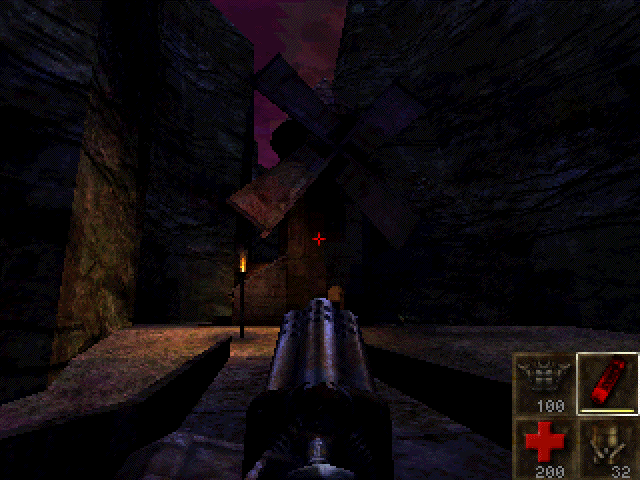
    Unreal, it came out on the PC months ago, set the PC world afire. Now it is out on the Mac, will it do the same? Easy this, of course it will, Unreal is simply the best 1st person shooter ever to appear on any platform. Sure it has some faults. This is the first and only game I have ever made a point to explore everything possible on my first time through. Even without a 3D card the game is stunning, absolutely stunning. It is the best looking game ever.

    Unreal screenshot
    (Click on Picture to Expand)

    Gameplay

    The gameplay is linear and gets fairly repetitive after a while. Kill and hunt for buttons/levers/switches, but then again every game of this type basically boils down to these elements. The AI for the monsters is the best I have seen, they run around, hide and retreat when being pummelled in a one on one. Some of are even bright enough to engage in pretty impressive ambushes and pincer movements. The weaponry on the other hand, looks good but is a bit underpowered. Unreal has a candidate for most useless weapon in a game, the ASMD. Never depend on it, it is pretty useless. There also no, huge nasty weapon, pocket nuke variety. The RezorJack and the Eightball are the most useful and my favourites.

    Unreal seems to me to have more replay value that most games of this ilk. There is suppose to be a Marathon TC for it soon, so the engine will be going for a long time methinks. Another reason that the game will be played over and over again is the fly cheat, this function allows you to fly around the level and see it in all its finery. Well worth it.

    I am unable to play multiplayer because of a rubbish internet connection and few people I know have computers able to handle the monster that is Unreal.

    Unreal screenshot
    (Click on Picture to Expand)

    Graphics and Sound/Interface/Difficulty

    Well there is not much one can say about either, other than wow. Nothing I have ever seen in any genre of game comes close to this. Nothing. There are places where things bleed into each other but that is rare. The music and visuals combine for an amazing ambience with is really apt to drag you in and leave you there. The interface is incredibly good and allows an amazing amount of feedback. While the mouse/keyboard combination is tricky to get used to, once it is mastered it provides incredible game play. Unreal will be a major time suck, even as a solo game.

    The game is not hard to play once you master the controls and know what to look for. The lighting even on the brightest of settings can be hard to deal with at first. Underwater and dark areas are also hard on the eyes. The biggest frustration is jumping up on ledges and the like. One has to perfectly aligned is some cases, this can be a tad annoying. The fly function solves this when you get really bogged down. A two button mouse or joystick would help when it comes to secondary fire, which is control on the keyboard. I have actually been too lazy to find a better more suitable key.

    Bugs

    There are a few annoying ones. Two of the levels I have played, so far, have areas where loading/saving causes the game to crash. Oddly enough this is only an isolated problem. There is some lagging in some of the more crowded rooms as well. This still occurs despite the fact that I am giving the game 96 RAM to run with.

    Unreal screenshot
    (Click on Picture to Expand)

    Conclusion

    Unreal is, well, unreal. It is an amazing game that has no competitors on the Mac. Its big problem is the fact that it requires so much powerful hardware. You cannot play this game is an reasonable fashion on anything less than a G3 with more than 96 RAM. The requirements are almost obscene. Saying that, Mark Adams and company have done a cracking job with this port. It was done quickly and well.

    So basically if you really want to enjoy this game here is what you do: 1. Buy a G3 2. Get as much RAM as you can afford (96+) 3. Get a 3d Card 4. Get a cable modem or a ISDN line 5. get some rich friends who can get all of the above as well.

    Find a copy

    Unreal has been out of print for years, but used copies of the original Mac release still turn up, and some classics have been re-released for modern systems. Search for Unreal on Amazon.

  • Fallout Mac Review (1998)

    Fallout Mac Review (1998)

    This post has affiliate links. If you buy through them, we may earn a small commission at no extra cost to you. Learn more.

    From the archive: this review first ran on the Mac Gaming Alliance (MGA), the Mac games site that lived here on DimensionZ in the late 1990s. It was published September 1998 and is reproduced as originally written. More in the Mac Gaming Alliance archive.

    Publisher MacPlay
    Tested on Performa 5260/100
    Gameplay 5 / 5 apples
    Graphics & Sound 5 / 5 apples
    Interface 4 / 5 apples
    Difficulty 5 / 5 apples
    Bugs 4 / 5 apples
    Overall 4.5 / 5 apples
    Reviewed by Jonathan Dreyer

    You are a vault dweller, your vault is in trouble, their water chip is damaged and it’s up to you to go out into the post-nuclear wasteland and find a new one. Although Fallout is advertised a Role Playing Game, I found it to be more like a hybrid cross between an RPG and an Adventure game, not quite either…

    Gameplay

    Fallout is a very detailed and complex game. Your main quest is to find a new Water Chip for your vault but, in order to accomplish that there are numerous other mini-quests to accomplish. As you travel the wasteland you will come across many different towns or villages, each filled with different types of people, be it Merchants, Police Forces, Gangs, Ghouls, or maybe even some Super-Mutants. One of my favourite parts of the game is all the different weapons you can find, using a flame thrower and watching your enemies be incinerated, or use the laser rifle to slice your enemies in half. I also liked the turn-based combat, so for people like me whose reflexes aren’t the greatest still have a chance to kick some ass in combat!

    Fallout is still mainly a RPG, you can create your own character or use one of the pre-made ones. As you advance in the game your character gains experience points and advances levels by destroying your enemies or completing mini-quests. As you advance your character’s level you are presented with choices of perks that allow your character to for example carry more weight or attack first in combat.

    Graphics & Sound

    The graphics in Fallout are good, not award winning good but still pretty good. I noticed that there were only a few actual “different” character graphics, like you see a guy with a red baseball hat in just about every town. Also, there were only a few different “town” graphic settings, just about all of the walls of just about all of the buildings were the same, I found it a little confusing to remember which building is which.

    The sound effects in Fallout are great! It seemed to me that almost every different gun had a different sound effect. To get the best out of the game I recommend that you use stereo headphones or a good pair of stereo speakers, heck you should do that for EVERY game.

    Interface

    Fallout has a interesting interface, it does not use any of the “Mac” dialog boxes that we are all used to, instead Fallout seems to be completely Operating System independent. I read that Fallout was programed using a platform OS independent programming library. I really hope that more and more game companies will begin to follow Interplay’s example

    Difficulty

    Fallout isn’t that difficult, there are no really complex puzzles or anything but, there are a lot of quests to go through to complete the game. I played about 4 hours a day for just over 2 weeks to complete the game. So I’d estimate that this game would take the average person about 40 to 70 hours to complete but, believe me it’s time well spent.

    Conclusion

    In conclusion, I am glad to see such a high quality game make it to the Mac. I found Fallout to be one of the best games I’ve played all year. It has a complex and rich plot that should provide any normal person with hours of enjoyment.

    Find a copy

    Fallout has been out of print for years, but used copies of the original Mac release still turn up, and some classics have been re-released for modern systems. Search for Fallout on Amazon.
  • Real Pool Mac Review (1998)

    Real Pool Mac Review (1998)

    This post has affiliate links. If you buy through them, we may earn a small commission at no extra cost to you. Learn more.

    From the archive: this review first ran on the Mac Gaming Alliance (MGA), the Mac games site that lived here on DimensionZ in the late 1990s. It was published August 1998 and is reproduced as originally written, with the original screenshots (click to enlarge). More in the Mac Gaming Alliance archive.

    Publisher MacSoft
    Tested on PowerMac 8600/300 w/32 mb RAM
    Gameplay 3 / 5 apples
    Graphics & Sound 4 / 5 apples
    Interface 3.5 / 5 apples
    Difficulty 2.5 / 5 apples
    Bugs 4 / 5 apples
    Overall 3.5 / 5 apples
    Reviewed by Jonathan Dreyer

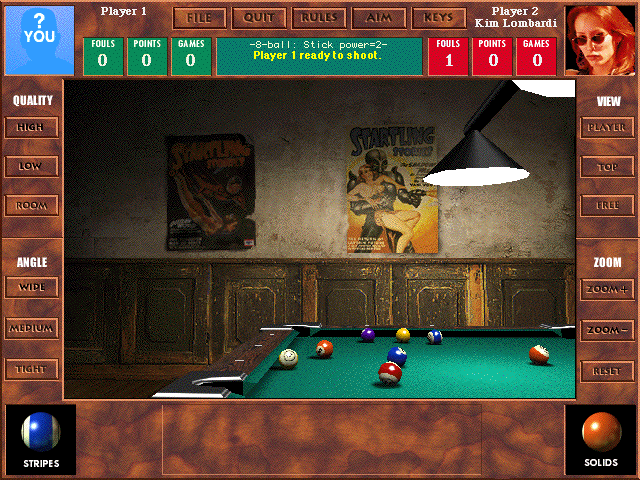
    Real Pool is one of MacSoft’s product that isn’t just aimed at the hard-core gamer. Real Pool contains all the elements that should make it a very fun game to play, but instead I found it average and at time mediocre. Real Pool does offer enjoyable variety and a lot of bang for your buck at it’s cheap suggested price tag of $29.99

    Real Pool screenshot
    (Click on Picture to Expand)

    Gameplay

    Real Pool offers you 6 different Pool games to test your skills at: 8-Ball, 9-Ball, Straight, Rotation, Carom (Spanish) Billiards, and Bumper Pool. When I sat down to play the only Pool Game I really knew how to play was 8-Ball, now I know how to play all 6 different games.

    • 8-Ball: You must pocket all of your balls either solids or stripes. After you have pocketed all of your balls you must then pocket the 8-ball to win the game.
    • 9-Ball: The cue ball must always strike the lowest-numbered ball on the table before striking any other balls, but you may use the lowest ball to pocket any other ball on the table. You win by pocketing the nine ball with a legal shot.
    • Straight: Pocket Balls, one at a time, in any order to score points. The first player to reach 150 points wins.
    • Rotation: Pocket Balls to score more points than your opponent. Each ball’s value in terms of points corresponds to it’s number. The first player to reach 61 points wins.
    • Carom Billiards: Score points by striking both the red ball and the other player’s cue ball with your own cure ball. First player to 30 points wins.
    • Bumper Pool: Pocket your 5 balls before your opponent pockets their’s.

    Real Pool advertises “realistic physics”, I found the physics of the game to be on the most part realistic until it came to the actual sinking of the ball, I found that the pockets were rather “loose” in letting shots in, about half the shots sunk wouldn’t have gone in in real life.

    Real Pool also supports the obligatory Multiplayer option, allowing people to play against each other on the same computer or over the internet. I tried the multiplayer option a few times but found that I preferred the variety of different computer opponents.

    Real Pool screenshot
    (Click on Picture to Expand)

    Graphics and Sound

    Real Pool does live up to it’s claim of 3D photo-realistic graphics. As you can see in the screen shots, in graphical terms this is the most realistic pool game I’ve ever seen. One word of warning, on slower Power Macs the graphics can really slow down the game requiring you to switch to the lower graphics setting which makes the balls look very blocky and pixilated.

    I had some problem’s with the music in RP. At times the music became very annoying and often distracting, but turning off the music made the game seem sort of eerie and weird.

    Real Pool screenshot
    (Click on Picture to Expand)

    Difficulty

    Real Pool has great variety in it’s difficulty by allowing you to choose from many different opponents. Each opponent has different skills and favors different shots. No two opponents are alike. You have never truly mastered a game until you have played and beaten all of the opponents.

    Real Pool screenshot
    (Click on Picture to Expand)

    Conclusion

    In Conclusion, Real Pool is the best pool simulator available for the Macintosh, although that’s not saying much because it’s only competitors are MacPlay’s Virtual Pool and a few shareware games.

    If want to play pool on your computer this game is for you because nothing else out there can match it in terms of variety and features.

    Find a copy

    Real Pool has been out of print for years, but used copies of the original Mac release still turn up, and some classics have been re-released for modern systems. Search for Real Pool on Amazon.

  • Deer Hunter Mac Review (1998)

    Deer Hunter Mac Review (1998)

    This post has affiliate links. If you buy through them, we may earn a small commission at no extra cost to you. Learn more.

    From the archive: this review first ran on the Mac Gaming Alliance (MGA), the Mac games site that lived here on DimensionZ in the late 1990s. It was published August 1998 and is reproduced as originally written, with the original screenshots (click to enlarge). More in the Mac Gaming Alliance archive.

    Publisher MacSoft
    Tested on PowerMac 8600/300 w/32 mb RAM
    Gameplay 5 / 5 apples
    Graphics & Sound 3.5 / 5 apples
    Interface 4 / 5 apples
    Difficulty 4 / 5 apples
    Bugs 4 / 5 apples
    Overall 4 / 5 apples
    Reviewed by Jonathan Dreyer

    When Deer Hunter was announced for the Mac by MacSoft it caused a bit of a stir in the Mac gaming community, some people even thought it was a joke. I know I thought “a Hunting simulation?!, they’ve got to be kidding!”, but after playing it I understood why it was a best-seller on the “other” side before coming to the Mac. Deer Hunter is a fun, enjoyable, and not to mention addicting game.

    Deer Hunter screenshot
    (Click on Picture to Expand)

    Gameplay

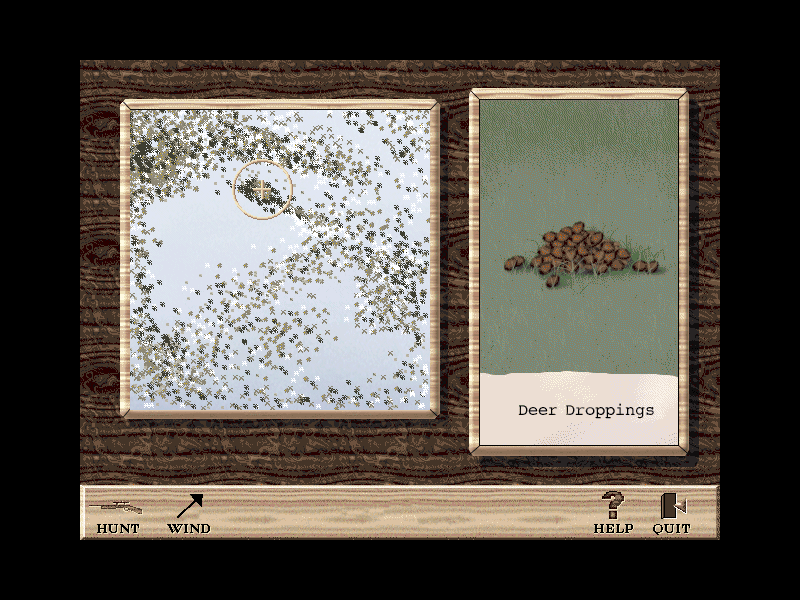
    Deer Hunter is a surprisingly simple game to learn yet very difficult to master. When you go hunting you have a choice between three weapons, a Rifle with scope, a 4-Shot Shotgun, and a Compound Bow. After you choose your preferred weapon you should go to the shooting range to practice before heading out on the hunt. Before you can go out hunting you have to decide on three options, whether you want to use a tree stand and hunt from in a tree, whether or not you wish to use an attracting scent, and whether or not you would like to use a cover scent to mask your bodily odors. When just starting out I recommended that you use all 3 options to lower the difficulty of bagging a deer, once you get more experienced the real fun comes from hunting without those aforementioned hunting peripherals. Once you have geared up for the hunt you can choose between 3 different areas to hunt from, an Indiana winter land, Colorado Alpine forests, and Arkansas autumn woodlands. Each area has it’s own advantages and disadvantages, my personal favorite being the Indiana winter land as it seems to have the large bucks. While hunting you have a deer call, an antler rattle, and binoculars to aid you. As soon as a buck comes into view you have to aim quickly and hope your first shot is good because you most likely won’t get another one.

    Deer Hunter screenshot
    (Click on Picture to Expand)

    Graphics and Sound

    The graphics in Deer Hunter are life like, although not as detailed as I would have hoped. The backgrounds reuse the same five or six trees and bushes over and over again. The grounds itself looks like a jpeg graphic that was tiled over the entire hunting area. The Deer, while graphically the most realistic part of the game, seemed to move very jerky and unnaturally. Overall the graphics are decent although somewhat mediocre in parts, you get what you pay for in this bargain priced twenty-dollar title.

    The sound of the forests in Deer Hunter are very life-like and realistic, you could almost close your eyes and imagine actually outside in a forest hunting deer. I quickly became annoyed with the hunter’s comments though, he only has a few different parts to say but he never seems to stop saying them, he says them over and over and over.

    Deer Hunter screenshot
    (Click on Picture to Expand)

    Difficulty

    Deer Hunter has no difficulty level per-say, but by utilizing the options of tree stand, attracting scent, and cover scent, you can greatly change the difficulty of the hunt. The problem with that is that the hunt then become either easy or hard, there is no medium difficulty. There are cheat codes for Deer Hunter but I won’t post them here because this is game I don’t believe anyone should cheat in as it completely takes the fun away.

    Deer Hunter screenshot
    (Click on Picture to Expand)

    Conclusion

    In Conclusion, Deer Hunter, although an unusual game these days, is unbelievably fun and amazingly addicting. Once you start playing Deer Hunter you want to keep on playing, always in search of the seemingly impossible to find 15 point size buck.

    I recommend this cheap bargain title to just about everybody except animal rights supporters. You should defiantly check this game out.

    Find a copy

    Deer Hunter has been out of print for years, but used copies of the original Mac release still turn up, and some classics have been re-released for modern systems. Search for Deer Hunter on Amazon.

  • Star Control 3 Mac Review (1998)

    Star Control 3 Mac Review (1998)

    This post has affiliate links. If you buy through them, we may earn a small commission at no extra cost to you. Learn more.

    From the archive: this review first ran on the Mac Gaming Alliance (MGA), the Mac games site that lived here on DimensionZ in the late 1990s. It was published June 1998 and is reproduced as originally written. More in the Mac Gaming Alliance archive.

    Publisher MacSoft
    Tested on PowerMac 7100/66
    Gameplay 4.5 / 5 apples
    Graphics & Sound 4 / 5 apples
    Interface 4 / 5 apples
    Difficulty 4.5 / 5 apples
    Bugs 5 / 5 apples
    Overall 4.5 / 5 apples
    Reviewed by David Leinbach

    Introduction

    Travel through hyperspace has now become impossible due to interdimensional fatigue. Now you have built a ship from Precursor technology which uses warp bubble technology to travel great distances. To try and reverse the collapse of hyperspace, you and a number of teams travel to the Kessari Quadrant. Unfortunately, the nature of the precursor ship scattered the teams throughout the Kessari Quadrant. Your mission is to rediscover the teams and restore hyperspace.

    Gameplay

    In MacSoft’s Star Control 3, you can play a normal game or you can jump right to battle’s with enemy ships. In Hyper Melee mode you can configure yours and your enemy’s fleet including the number of ships, and the types of ships. You can also choose whether you wish to use mouse or keyboard control, the skill of the computer and you can even play Hyper Melee mode over the modem. Once you have setup the game, you choose a ships, one at a time, to battle in one-on-one battles until only you or the enemy’s fleet remains. In battle, you can easily control you ship from the arrow pad, Ctrl, and Option key for player one and C, V, B, X, and Z for player 2(in a human vs. human game). You can change the view and speed the improve the amount of enjoyment received from this mode of play.
    In Adventure Game mode, you must locate the teams and new alien races plus you must colonize new worlds to gain resources for ships. Lastly, you must discover Precursor alien artifacts which may help in reversing interdimensional fatigue. Once you get into the game, you will learn that you of another race which has only been referred to as the Eternal Ones who feed on other races and they may be the cause of all your problems. While fulfilling your mission, you will encounter races who will not take kindly to your presence and may force you into battle. Once you enter battle, the computer will choose one of your ships and one of the enemy’s(if there are more than one). They will then enter battle. One complaint I do have is that you cannot control your own ships.

    Graphics & Sound

    The graphics in this game are very well done. What more can I say? The in-game movies are partially blocky however most of them, including the alien races who look nothing like human actors, look as if they were just recorded onto the computer using an electronic video camera.
    The sound is almost as professionally done as the graphics but they are not as realistic as would be preferred. Some of the gun shots sound as if they were created in 5 minutes. Even so, I found that the gameplay distracted me enough that I didn’t notice it that much.

    Interface

    This game has a fairly intuitive interface. I was able to learn to use most of the functions of this game without having to read the manual. Most of the buttons use graphics that allow you to easily navigate through the game and actually succeed. The method of transferring crew from ship to ship to colony and back is easily implemented by clicking on the source/destination and selecting how many people you want left on you head ship. Selecting how much resources to allocate to each industry in a colony is accomplished by moving a slider control. The only complaint I have relating to the interface is that while in communication with some aliens, your choices available are severely limited at times. One limitation that I wish they had removed was that you cannot exit a communication at any time.

    Difficulty & Bugs

    I almost wrote that this game had a perfect difficulty level when I realized that this was not true. This game almost had a perfect difficulty level but I found it too easy which is why I thought it was perfect because I was able to win in this game. As you play the game gets harder because you must battle ships which have an increasing difficulty and you must solve some difficult problems.
    As for bugs in this game, I encountered none except for what could be considered a bug but also could be blamed on the hardware. While playing the introductory movies at the beginning of the game, the sound was really choppy. Other than that, the game seemed fine.

    Conclusion

    This game is a very enjoyable diversion from the normal types of games. When I started playing this game I thought that it would be boring but I ended up playing for 4 hours straight. Anyone who enjoys strategy games will definitely enjoy this game and I am almost positive that anyone will enjoy playing this game. The amount of thought that this game requires is enough that you won’t get bored because of it being to easy while at the same time is not so much that you decide to give up because of boredom in that way. Overall, if you have a CD-ROM drive of 4x or faster then you should definitely consider this game.

    Find a copy

    Star Control 3 has been out of print for years, but used copies of the original Mac release still turn up, and some classics have been re-released for modern systems. Search for Star Control 3 on Amazon.

  • Diablo Mac Review (1998)

    Diablo Mac Review (1998)

    This post has affiliate links. If you buy through them, we may earn a small commission at no extra cost to you. Learn more.

    From the archive: this review first ran on the Mac Gaming Alliance (MGA), the Mac games site that lived here on DimensionZ in the late 1990s. It was published June 1998 and is reproduced as originally written, with the original screenshots (click to enlarge). More in the Mac Gaming Alliance archive.

    Publisher Blizzard
    Tested on PowerMac 8600/300 w/32 mb RAM
    Gameplay 4.5 / 5 apples
    Graphics & Sound 4 / 5 apples
    Interface 5 / 5 apples
    Difficulty 2.5 / 5 apples
    Bugs 5 / 5 apples
    Overall 4.5 / 5 apples
    Reviewed by Jonathan Dreyer

    Diablo is here! Finally, after a long and painful two year wait for the much anticipated PC “Game of the Year 1996” it is available on the Macintosh. Was it worth the long long wait? Probably not. But is it a fun and addictive game? You bet! Does Diablo have it’s share of drawbacks? Of course…

    Diablo screenshot
    (Click on Picture to Expand)

    Gameplay

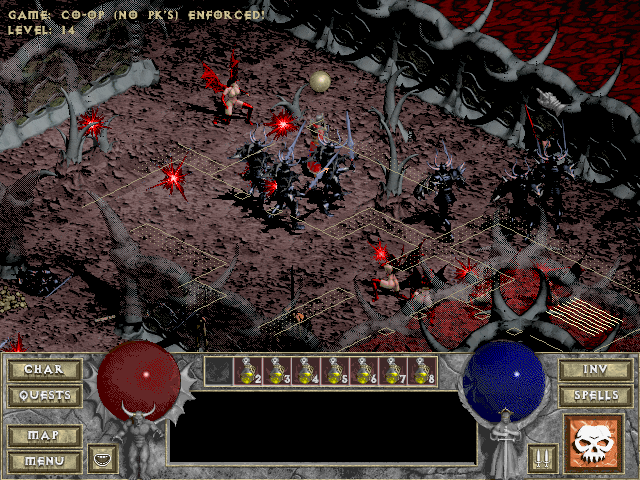
    One of the main draws of Diablo is it’s unique role playing game style with real time combat elements. In Diablo you play one of three different styles of character’s, a Warrior, a Rogue, or a Sorcerer, each have there own special skills and abilities to be used at your discretion in your quest to defeat the evil Diablo. Using a local town as your starting point you advance underground thru the Dungeon, Catacombs, the Caves, and finally to Hell where you will face Diablo. Throughout those sixteen levels of action you gain experience points, learn new spells, or find more items and weapons to try to cram in your space-limited inventory. An interesting note about Diablo is it’s randomization factor, every time you lay the game the underground levels will be different, you will never play the same game twice! Single player Diablo, although fun, is easily beaten within a few days of playing and then becomes boring and repetitive. The really fun part of Diablo is multi-player over the Internet thru Blizzard’s Battle.Net server system.

    Diablo screenshot
    (Click on Picture to Expand)

    Easy to access multi-player gaming is definitely the gem in Diablo’s crown. Using Blizzard’s Battle.Net server thru the internet made Diablo the easiest game to setup I have ever played over the internet. The biggest problem with Battle.Net internet play is the large number of PC players online using hacks and other cheats to make a lot of Battle.Net games very unfair to Mac users who have no cheats available to them. Still, if you can find legitimate games to take part in you can have some real fun.

    Diablo screenshot
    (Click on Picture to Expand)

    Graphics and Sound

    The graphics in Diablo are definitely nothing to brag about! Although they’re decent gaming graphics a few minor flaws are exaggerated through some of the games features. One of the most annoying features of Diablo is the zoom feature, game zooms in on your character but the graphic begin to getting very pixilated. They should have just left that feature out entirely for all of it’s usefulness. Another inherit flaw of the game is it’s fixed view point. There is only one view of you character, no on the fly rotating, just one fixed view, which while in deep battle can become a very mean curse.

    The sound effects in Diablo are average for a game these days, nothing spectacular or exciting just your average everyday sound effects. The music on the other hand was horrible! I found the music so annoying to play with I just turned it off all together. I don’t know why Blizzard would put such mediocre music in a game like this.

    Interface

    Interface’s like the one found in Diablo are seeming to becoming the norm these days. Interfaces with in-game graphical control boxes and no Mac-like interface dialogue boxes. I assume this is for faster porting times but, I don’t see how this would be the case in Diablo.

    (Click on Picture to Expand)

    Difficulty

    Diablo has no difficulty. Not literally but in a manner of speaking, Diablo simply is not challenging under single-player playing. The only challenge in Diablo comes from multi-player play where you have to match wits and might against actually humans.

    Conclusion

    During the long porting time of Diablo for Mac it appears they really did a good job of optimizing and bug checking it. I encountered no bugs over the 100 plus hours of time I spent playing it.

    Diablo is a great “multi-player” game! I would only reexamined this to gamers with lot’s of internet time to spend on Battle.Net, forget about single-player gaming altogether.

    Find a copy

    Diablo has been out of print for years, but used copies of the original Mac release still turn up, and some classics have been re-released for modern systems. Search for Diablo on Amazon.

  • Carmageddon: Splat Pack Mac Review (1998)

    Carmageddon: Splat Pack Mac Review (1998)

    This post has affiliate links. If you buy through them, we may earn a small commission at no extra cost to you. Learn more.

    From the archive: this review first ran on the Mac Gaming Alliance (MGA), the Mac games site that lived here on DimensionZ in the late 1990s. It was published March 1998 and is reproduced as originally written, with the original screenshots (click to enlarge). More in the Mac Gaming Alliance archive.

    Publisher SCi
    Tested on PowerMac 7300/180
    Gameplay 5 / 5 apples
    Graphics & Sound 4 / 5 apples
    Interface 4 / 5 apples
    Difficulty 5 / 5 apples
    Bugs 2 / 5 apples
    Overall 5 / 5 apples
    Reviewed by Marty Dodge

    SCI in their infinite wisdom has decided not to bring the Splat Pack out for the Mac. So why the review? Well being that Mac people are always used to having to do things for themselves, several people mucked around with the files in Carmageddon and the Splat Pack and determined that most of the files for the PC and the Mac are identical. Many of us have been using PC cars in Carmegeddon for months. A sort of group think was held in the discussion group of Carmageddon.Com and several of us decided to give it a shot.

    Carmageddon: Splat Pack screenshot
    (Click to Expand)

    As you may have determined by now, it worked. Starting with the demo of the Splat Pack we discovered it would work, if you were willing to put in about 40 minutes of annoying and careful copying across. James then determined that the complete Splat Pack could be used the same way. I went as far as to buy the PC version but ended up not getting round to experimenting. This was still an onerous and time consuming task. Until that is… James decided to write an Applescript program to copy all this stuff for you. If you have a copy of the Splat Pack and 40 minutes of time, Splat Pack Installer will do it all for you. SCI should give James a contract as we speak, he saved them a hell of a lot of time and money and they still get to sell the Splat Pack to Mac owners.

    Now some of you might want to get boycott SCI for not bringing out the Splat Pack for the Mac. Get mad for a few minutes and get over it. Remember, we want them to bring out Carmageddon II for the Mac, after all the thing is being done on a Mac. If you have not yet seen screenshots of it go to MacInkill and enjoy your future. It looks amazing and should be a blast to play. We should also be happy that SCI made the programming so easy to much about with, that is why Carmageddon has staying power. One last thing, because the Splat Pack is a fairly “old” title you can buy it for very little on sale at major outlets or by mail-order.

    Carmageddon: Splat Pack screenshot
    (Click to Expand)

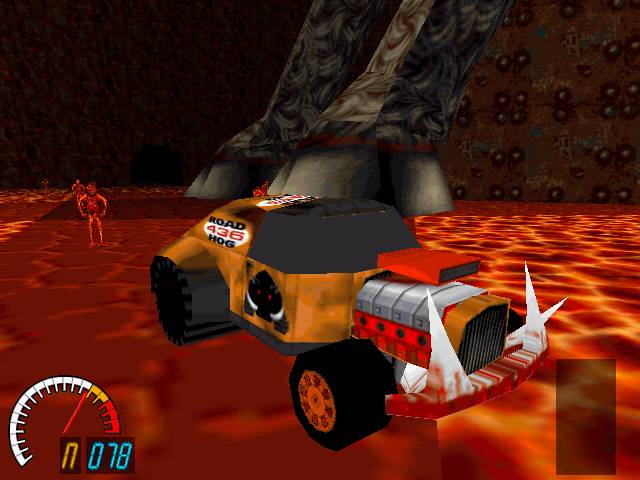
    Now that is off my chest, the add-on that is the Splat Pack. The game play is the same as the full game, but the graphics have been approved, and the opponents are a lot more fun. The tracks, besides “Ring of Fire” which for some reason will not work on the Mac, are neater as well (range from Aztec to Myst—like islands.) The tracks for the most part are harder than in the full game. Some of the jumps and curves are killer. Cars are great as well. There is nothing better than nailing a pesky Citroen CV with the Peterbilt semi-cab, and watching the little commie bastard fly across the screen. Other standouts are: a Duesenberg, a monster truck and Chevy from the 70s. There are now sheep & boar as well the ever present cows and people to hit as one drives round the track. Your original cars seem to have improved handling and combined with the more macho grunt of the engine, both give real pleasure. (For the Eagle II, just think cartoon Batmobile that is red.)

    To Get the Mac Splat Pack Installer, visit MacInKill

    Find a copy

    Carmageddon: Splat Pack has been out of print for years, but used copies of the original Mac release still turn up, and some classics have been re-released for modern systems. Search for Carmageddon: Splat Pack on Amazon.

  • Top Gun: Fire at Will Mac Review (1998)

    Top Gun: Fire at Will Mac Review (1998)

    This post has affiliate links. If you buy through them, we may earn a small commission at no extra cost to you. Learn more.

    From the archive: this review first ran on the Mac Gaming Alliance (MGA), the Mac games site that lived here on DimensionZ in the late 1990s. It was published March 1998 and is reproduced as originally written, with the original screenshots (click to enlarge). More in the Mac Gaming Alliance archive.

    Publisher Macsoft
    Tested on PowerMac 8600/300 w/ 32mb RAM
    Gameplay 5 / 5 apples
    Graphics & Sound 2 / 5 apples
    Interface 4 / 5 apples
    Difficulty 5 / 5 apples
    Bugs 4 / 5 apples
    Overall 3.5 / 5 apples
    Reviewed by Jonathan Dreyer

    Top Gun: Fire at Will is an interesting game, it’s not quite a full fledged flightsim and not anywhere near an action game. Top Gun is a Flightsim/Arcade hybrid, the flight controls are not nearly as complex as in F-18 Hornet, allowing Top Gun an arcade like gameplay.

    The action begins at Top Gun School, where you’ll compete for the coveted Top Gun Trophy. Then, you’ll lead your wingmen through fierce aerial combat in a burgeoning global crisis. Top Gun gives you the ultimate that modern F-14 dog fighting has to offer.

    Top Gun: Fire at Will screenshot(Click to Expand)

    Gameplay

    Although I said that the control of Top Gun were simple compared to Hornet, that doesn’t mean that an idiot could fly the famous F-14 Tomcat. All the necessary aircraft control to be a successful pilot but the emphasis has been put on gameplay, not realism. While Hornet is a better simulator, Top Gun is by far a better GAME.

    Top Gun: Fire at Will screenshot(Click to Expand)

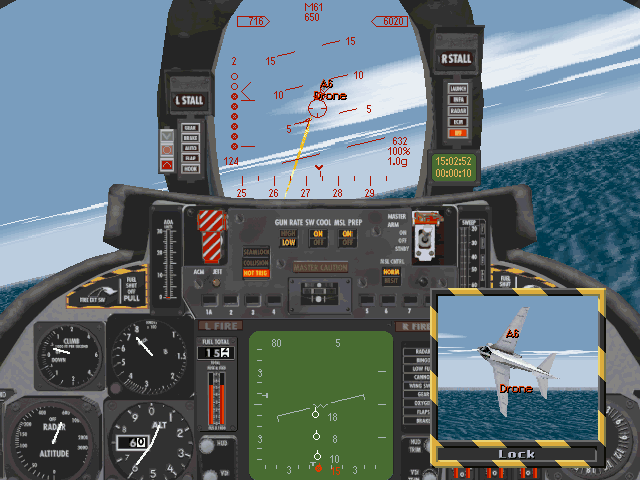
    The Gameplay is the greatest part of Top Gun. You start in the Top Gun school where you go through numerous training missions, each one increasing in difficulty from the one before, your goal is the infamous Top Gun Trophy. There are plenty of mission in many varieties, night flying, escort runs, carrier takeoffs, carrier landings, etc… You have 4 different weapons at your disposal for success in those missions, the M61A1 “Vulcan” cannon, AIM-7 Sparrow missiles, AIM-9M Sidewinder missiles, and AIM-54 Phoenix missiles. And of course you have your RIO sitting right behind you waiting for a chance to give his sarcastic advice. The Top Gun school missions are a perfect to give the flightsim newbies the basics of takeoffs, landings, and dog fighting. There were even some Top Gun school missions later on that I (the flightsim expert) had trouble with, namely the grand canyon mission where you have to stay under the rim of the canyon while dog fighting 3 enemy planes, that was one of the toughest flightsim missions I’ve ever flown.

    Top Gun: Fire at Will screenshot(Click to Expand)

    Graphics & Sound

    The graphics of Top Gun are it’s biggest flaw, they stink. The graphics seem to be heavily pixelated even at the highest graphic settings available. The ground and the ocean look ugly, as you can see in some of the screenshots scattered throughout this review. Objects look great, such as other planes and buildings but, the rest of the Top Gun world is almost painfully ugly, if it wasn’t for the great gameplay this game would really suck.

    Top Gun: Fire at Will screenshot(Click to Expand)

    The sound and music of Top Gun is wonderful. It even has the Top Gun song from the movie (although sung by a different singer). The music perfectly balanced for the levels giving it just the right amount of atmosphere without being too distracting. Sound effects in Top Gun were nothing special, the missile sounds are the same for every missile you have and the gun sound is rather annoying when trying to shoot down your enemies.

    Interface

    Top Gun is a top notch port. All the expected macintosh elements were there, including the use of Apple Input Sprocket for joystick support. Note: I found a conflict with SpeedDoubler 8 and the input sprocket, to play disable SpeedDoubler first.

    Difficulty

    Top Gun has a perfect difficulty balance, each mission get progressively harder from the one before. This balance allows you to master the basics of flying in Top Gun without being forced to fly unusually difficult missions.

    Top Gun: Fire at Will screenshot(Click to Expand)

    Conclusion

    In conclusion, Top Gun has the best gameplay of any game I’ve played recently but, if you’re looking for a flightsim, this is not for. Top Gun is more for gamers with little or no flightsim experience or who just want to play a really fun game. Once you look past the graphics into the gameplay, you’ll realize that Top Gun is great game.

    Top Gun: Fire at Will screenshot(Click to Expand)

    Find a copy

    Top Gun: Fire at Will has been out of print for years, but used copies of the original Mac release still turn up, and some classics have been re-released for modern systems. Search for Top Gun: Fire at Will on Amazon.

  • Duke it out in D.C. Mac Review (1998)

    Duke it out in D.C. Mac Review (1998)

    This post has affiliate links. If you buy through them, we may earn a small commission at no extra cost to you. Learn more.

    From the archive: this review first ran on the Mac Gaming Alliance (MGA), the Mac games site that lived here on DimensionZ in the late 1990s. It was published March 1998 and is reproduced as originally written. More in the Mac Gaming Alliance archive.

    Publisher Macsoft
    Tested on PowerMac 6500/250
    Gameplay 5 / 5 apples
    Graphics & Sound 5 / 5 apples
    Interface 5 / 5 apples
    Difficulty 4 / 5 apples
    Bugs 5 / 5 apples
    Overall 5 / 5 apples
    Reviewed by J. Driver

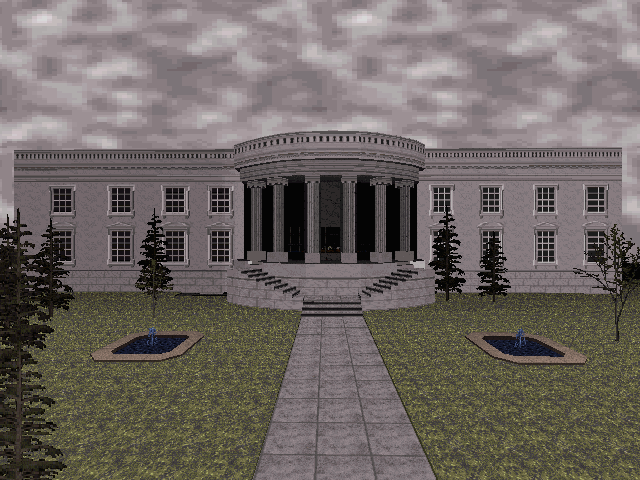
    Duke it out in D.C. is an add-on pack created for Duke Nukem 3D. In this expansion pack, you visit important government buildings, historical monuments, museums, and utilities, while tracking down the kidnapped President.

    Gameplay

    This is an expansion pack for Duke Nukem, so the interface is the same. Gameplay is very fast in this pack, if you have a Power Macintosh. You can go places where the average person in Washington D.C. could not go: in the Oval Office, the FBI lab, the sewer system, and even climb Lincoln’s statue! The most visually amazing level, to me, was the one of the Metro system, Washington D.C.’s subway system. There were abandoned stations, train crashes, extra trains, graffiti, and everything that you would expect out of a big subway system. If you were disappointed with the original subway level in Duke Nukem, then get this pack! Subways, of course, are not everything. My second favorite level was of the Smithsonian! The first time I played that level, I thought it was a total digitized version of that museum! The virtual museum had an art gallery, collections called “Humans in Space”, “The Living Ocean”, and “The Lost Worlds”, many elevators, information desks, vending machines, restrooms, fountains, and more! The only things it were missing were restaurants and gift shops. Overall, it was the best game I ever played!

    Screenshots:
    Screenshot #1
    Screenshot #2
    Screenshot #3

    Graphics and Sound

    There are many new graphics in Duke it out in D.C.: signs of federal buildings, a new brick texture for sewers, textures for the subways, and many more! While there were no new sounds, the textures and levels make up for the loss.

    Interface:
    There is no new interface in this pack. There were, however, some new graphics in the startup screen.

    Difficulty

    The levels, while being very large, also supply a good number of enemies. I did feel, however, that weapons could have been more evenly distributed.

    Conclusion

    Duke it out in D.C. was well worth the wait for a Macintosh version! You actually felt like you were in Washington D.C.! I would highly recommend this expansion pack for anyone interested in America’s capital!

    Find a copy

    Duke it out in D.C. has been out of print for years, but used copies of the original Mac release still turn up, and some classics have been re-released for modern systems. Search for Duke it out in D.C. on Amazon.